
Beginner's guide
How Do I Withdraw Crypto in the EU?
Beginner
2026-05-22 | 5m
As the regulatory framework for digital assets in Europe continues to mature, investors require secure, transparent, and compliant platforms to manage their portfolios. If you are trading on a regulated crypto exchange in the EU, understanding the correct procedures for moving your funds is essential for safeguarding your assets.
For users looking for a definitive guide on how to withdraw crypto in the EU, Bitget EU provides a streamlined and legally compliant withdrawal process, tailored to meet stringent European regulatory standards.
This guide covers all withdrawal methods on Bitget EU (website): external wallet withdrawals, internal transfers between Bitget EU accounts, and Travel Rule compliance steps required under EU regulations.
External Wallet Withdrawals
An external wallet withdrawal is the standard process of transferring your cryptocurrency directly from your Bitget EU account to an external wallet address on the blockchain.
Through this method, your digital assets are transmitted across a designated blockchain network and securely settled on the public ledger. External wallet withdrawals are the primary way to move your funds off-platform, whether you are transferring assets to a private, self-custody wallet (such as a Ledger or MetaMask) or sending them to another regulated crypto exchange.
Step 1: Open the Withdrawal Page
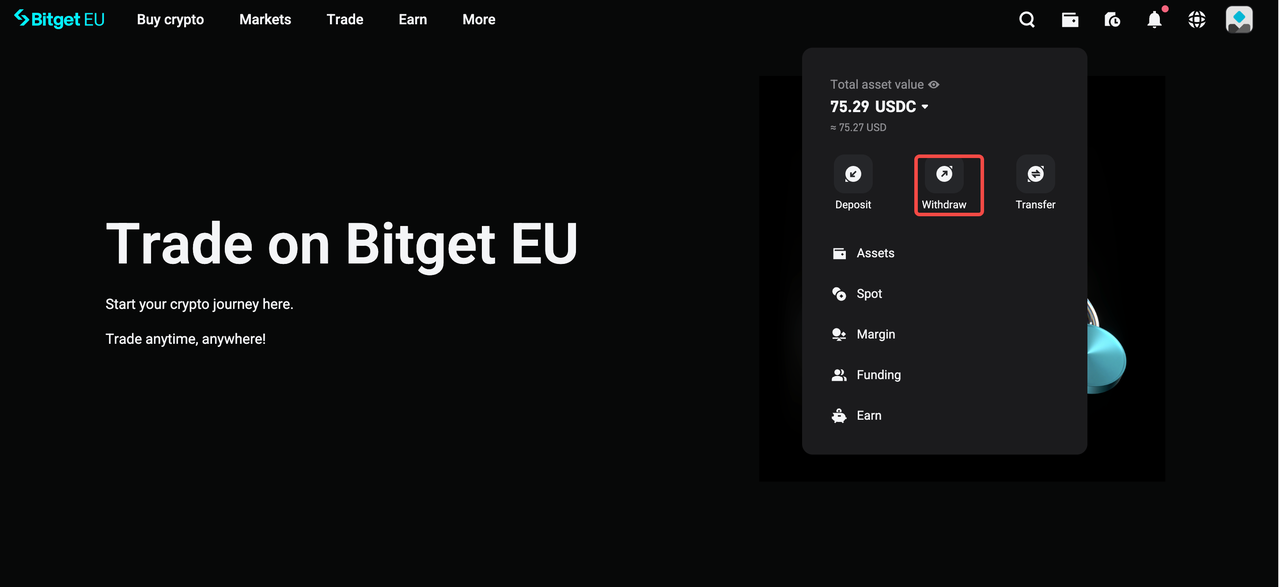
Log in to your Bitget EU account and hover the pointer on the wallet icon on the top right of the navigation bar. Click on
[Withdraw].
Step 2: Select Asset, Network, and Enter Your Address
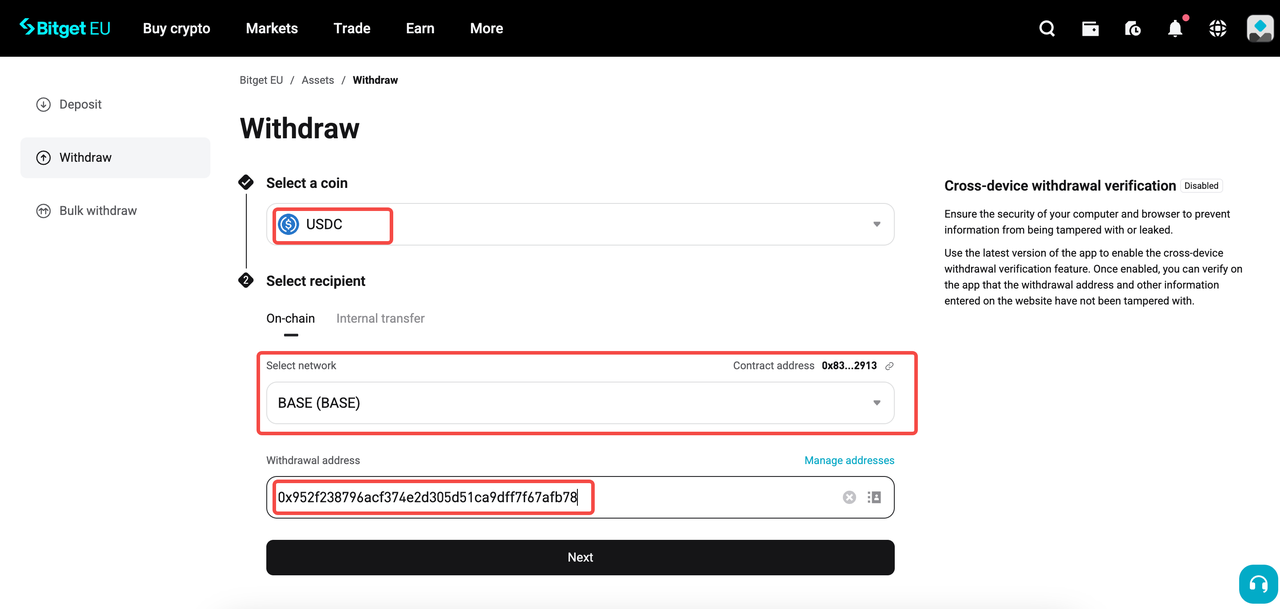
Using the drop-down menus on the withdrawal page, select the specific crypto / token you intend to transfer. Next, choose the corresponding blockchain network.
You will need the exact public address of your wallet. Open your destination wallet, click on
Receive
or
Deposit and choose the asset you want to withdraw. Copy the receiving address from your wallet and paste it into the Bitget EU withdrawal page. Double-check the address to ensure accuracy before proceeding.
Note
: Ensure the network you select on Bitget EU perfectly matches the network of your receiving wallet. Selecting an incorrect or incompatible network will result in the permanent loss of funds.
Step 3: Enter Amount and Confirm
Enter the amount you want to withdraw. Please be aware that all external wallet withdrawals are subject to a mandatory blockchain network fee (commonly referred to as a "gas fee"). This fee is required to process and validate your transaction.
Pro Tip
: When calculating your transfer, ensure your available Bitget EU account balance is sufficient to cover both your intended withdrawal amount and the associated transaction fee. The interface will transparently display the current network fee and the final, net amount your external wallet will receive before you confirm the transaction.
|
What is a Transaction fee? A transaction fee (also commonly referred to as a "network fee" or "gas fee") is the cost paid to blockchain validators for processing and confirming your transaction. It is a mandatory cost determined entirely by the underlying blockchain network itself. The amount varies based on network congestion and computational complexity of the transaction. Bitget EU does not set or charge this fee.
However, please note that Bitget EU may charge a separate withdrawal fee depending on the specific asset and blockchain network selected. Always review the fee breakdown on the withdrawal confirmation screen before finalising your transaction.
|
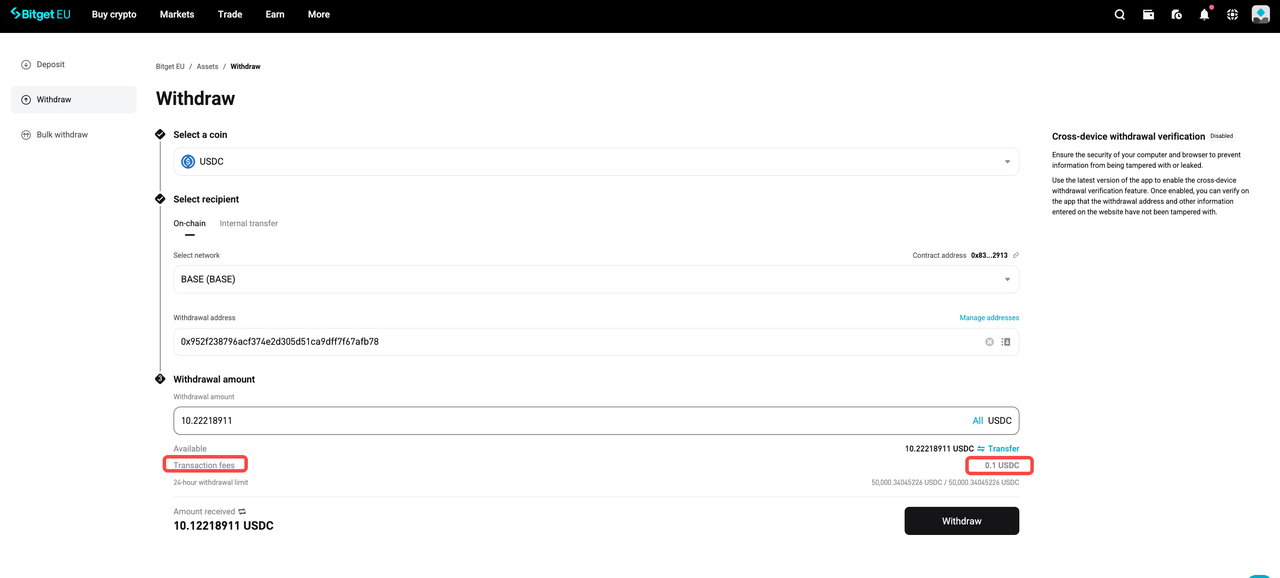
Carefully review both the exact network fee and the final net amount that will arrive in your destination wallet, then click
[Withdraw].
To help verify your account and withdrawals, Bitget EU may require 2FA and additional verification for outbound transfers. You will be prompted to input your verification credentials, which typically include a time-sensitive code from your Google Authenticator app and a verification code sent to your registered email address.
After successful authentication, your transaction will be broadcast to the blockchain. Settlement times generally take only a few minutes; however, please note that the exact duration depends entirely on the current traffic and block confirmation requirements of your chosen blockchain network, rather than the Bitget EU platform itself.
Internal Transfers
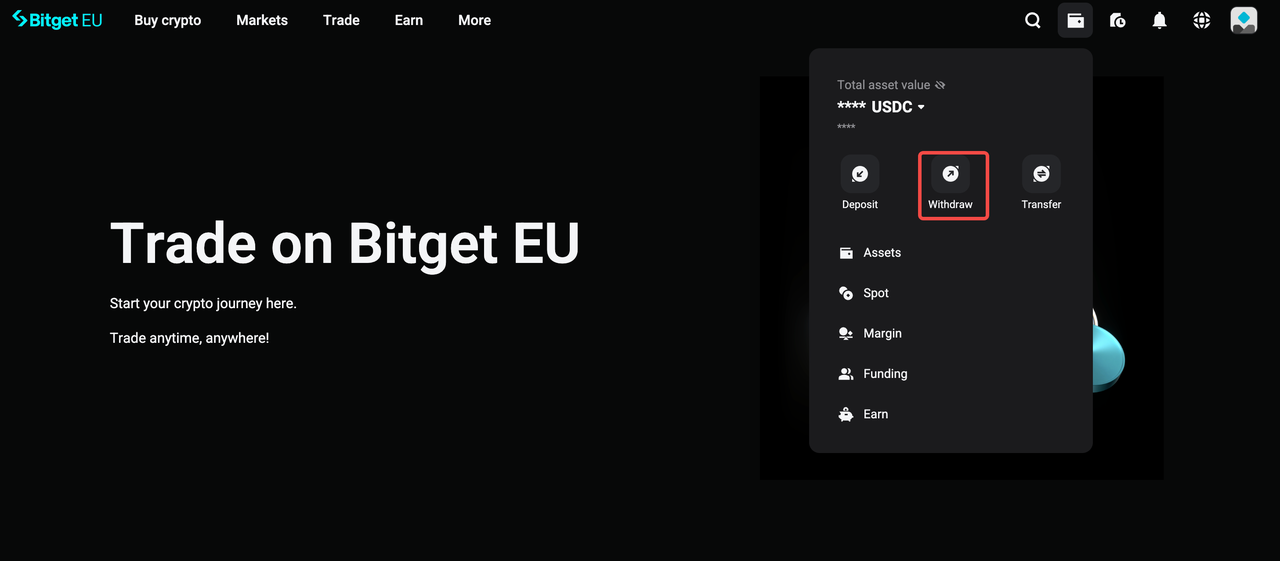
Step 1: Open the Withdrawal Page
Log in to your Bitget EU account and hover the pointer on the wallet icon on the top right of the navigation bar. Click on
[Withdraw].
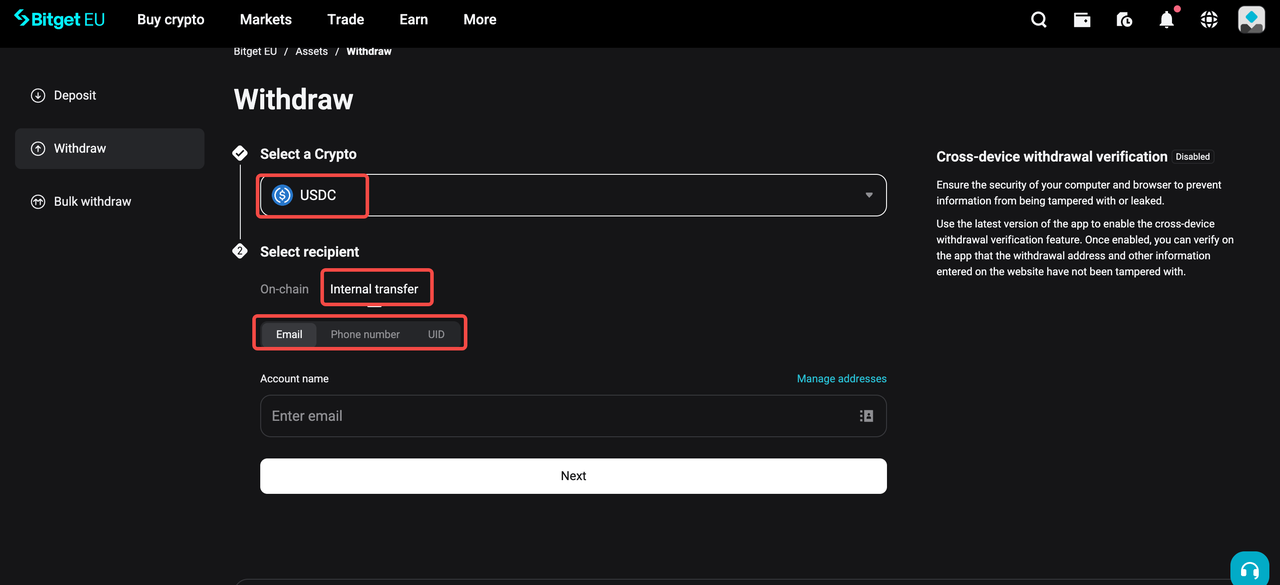
Step 2: Select Asset, Network, and Enter Your Address
Using the drop-down menus on the withdrawal page, select the specific crypto / token you intend to transfer. Next, select Internal transfer and choose to send funds via Email, Phone, or UID.
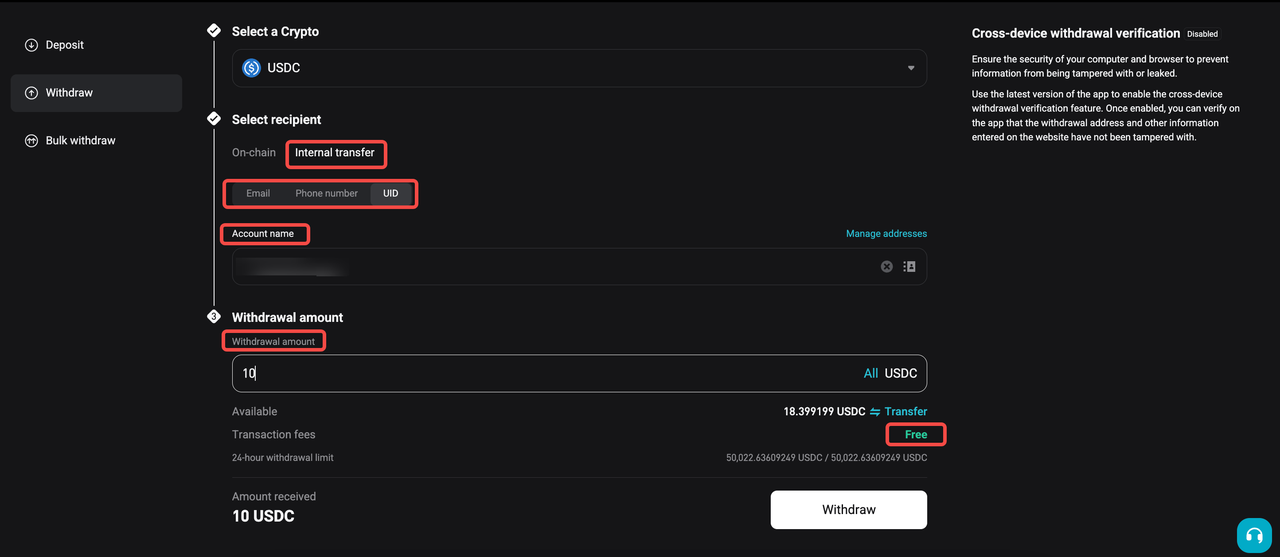
Step 3: Enter Amount and Confirm
Enter the recipient's account details and specify the withdrawal amount, then click
[Withdraw]. Bitget EU does not charge fees for internal account-to-account transfers.
Travel Rule Compliance for Withdrawals
What Is the Travel Rule?
The Travel Rule is a regulatory framework recommended by the Financial Action Task Force (FATF). It mandates that Virtual Asset Service Providers (VASPs) collect, verify, and securely transmit specific customer data during digital asset transfers. By establishing transparency in financial transactions, this rule serves as a critical mechanism for combating money laundering and countering the financing of terrorism (AML/CFT).
As a fully regulated platform, Bitget EU provides a compliant, institutional-grade trading environment. To maintain these rigorous European standards, we operate in strict compliance with Regulation (EU) 2023/1113.
This means you may be asked to provide originator / beneficiary information when initiating a withdrawal, depending on the destination and the Travel Rule requirements.
The Travel Rule protocol applies to all outbound transfers, regardless of the destination. You will be prompted to provide this information whether you are sending your digital assets to another VASP (such as an exchange or crypto platform) or to a private wallet (such as MetaMask).
Who Is Affected?
As a registered Bitget EU user, you are operating within a compliant ecosystem designed to align with the broader MiCA (Markets in Crypto-Assets) regulatory framework. Consequently, when initiating a withdrawal to an external destination, you may be prompted to provide supplementary information regarding the recipient of the virtual assets.
Fortunately, the European digital asset infrastructure is designed for efficiency as well as compliance. If you are withdrawing funds to another regulated Virtual Asset Service Provider (VASP), such as a partner exchange, that already utilises compatible Travel Rule data-sharing protocols with Bitget EU, the compliance check is largely automated. In these instances of VASP-to-VASP transfers, you generally will not need to manually submit duplicate recipient details, ensuring a frictionless and rapid withdrawal experience.
How It Works: Step-by-Step
|
Step
|
Action
|
|
Step 1
|
Select the withdrawal destination (VASP / private wallet / self-transfer).
|
|
Step 2
|
Confirm whose account you are withdrawing to (your own or a third party's).
|
|
Step 3
|
Provide required information based on destination type (see below).
|
|
Step 4
|
Complete wallet ownership verification if applicable.
|
|
Step 5
|
Once approved, provide the legal name of the recipient to finalise withdrawal.
|
Withdrawals to VASPs (Exchanges or Crypto Platforms)
In particular circumstances, you may be required to provide:
-
Name of the beneficiary exchange or crypto platform
-
Whether the withdrawal is to an individual or a company account
Withdrawals to Private Wallets (e.g., MetaMask)
In particular circumstances, you may be required to provide:
-
Wallet ownership verification if the withdrawal amount exceeds 1,000 EUR (via cryptographic signature or Satoshi test)
-
Legal name of the beneficiary
Wallet Ownership Verification Steps
Step 1: Click the share button to proceed with wallet ownership verification.
Step 2: Depending on the recipient:
-
If funds are withdrawn to a third-party wallet: you may either complete the required information yourself and send a secure link to the recipient by email, or send the secure link to the recipient to complete verification.
-
If funds are withdrawn to your own wallet: you can proceed directly to wallet ownership verification without completing recipient details.
Step 3: The recipient completes wallet ownership verification by opening the secure link. Two methods are available:
- Option A — Cryptographic Signature: Select the designated private wallet or mobile wallet (WalletConnect) and connect the wallet to complete the verification.
- Option B — Satoshi Test: Send a small transaction from your wallet and provide the transaction hash to confirm ownership.
Step 4: Once ownership verification is successfully completed, the status will display
"Approved". You may then provide the legal name of the recipient to complete the withdrawal.
⚠️ Travel Rule verification is per unique receiving address. Once you verify an address, future withdrawals to the same address won't require re-verification.
⚠️ To make withdrawals, you must first complete KYC/identity verification. There is no restriction on deposits, but withdrawals require a verified account.
💡Need help? If your withdrawal is delayed or you encounter issues with Travel Rule verification, contact
Bitget EU Support with your transaction ID and wallet details for fastest resolution.
The opinions expressed in this article are for informational purposes only. This article does not constitute an endorsement of any of the products and services discussed or investment, financial, or trading advice. Qualified professionals should be consulted prior to making financial decisions.
Share


Content
- External Wallet Withdrawals
- Internal Transfers
- Travel Rule Compliance for Withdrawals
Recommended
 The Uncensored Guide on How to Spot Trade on Bitget EU2026-05-22 | 5m
 Bitget EU VIP Premier Wealth Hub Introduction2026-05-25 | 5m
 How to Buy Crypto With a Credit/Debit Card on Bitget EU2026-05-22 | 5m
Up to 6200 USDC and LALIGA merch await new users!
Claim