
Beginner's guide

How To Trade And Swap Crypto Within The EU
Beginner
2026-05-22 | 5m
Navigating the European digital asset market requires a platform that balances regulatory compliance with trading technology.
Whether you are an institutional investor looking for a regulated platform in the EU to execute trades, or a retail trader looking for a simple way to swap digital assets, the Bitget EU Convert feature allows users to bypass complex spot market order books and execute trades at a quoted rate.
This guide provides a step-by-step overview of the Bitget EU Convert feature, detailing how to exchange digital assets efficiently on a platform adhering to EU regulatory requirements.
What Is Bitget EU Convert?
Bitget EU Convert is a digital asset trading tool that allows users to swap cryptocurrencies without navigating spot market order books. It provides an interface for executing swaps at quoted rates.
Instead of placing maker or taker orders and waiting for them to fill, users are presented with a locked exchange rate generated by an algorithmic pricing engine. Once accepted, the transaction settles instantly.
How To Swap Crypto With Bitget EU Convert: A Step-by-Step Guide
Follow these steps to swap your digital assets efficiently. Please note that applicable fees depend on the specific asset pair and will be displayed in the quote before confirmation.
Step 1: Access the Convert Page
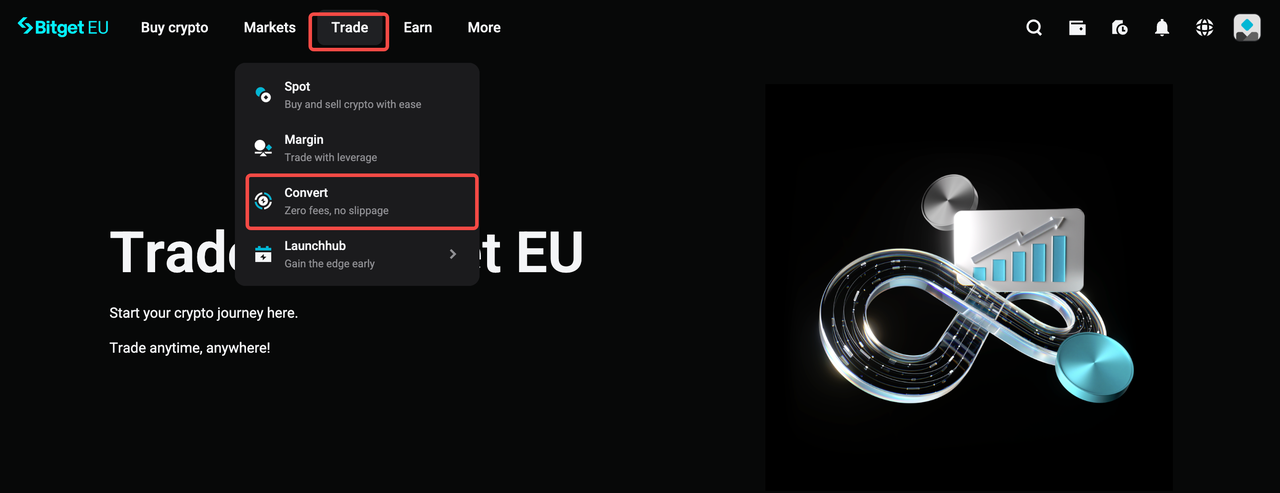
Ensure you are logged into your account on Bitget EU. Navigate directly to the
Bitget EU Convert page, or access it from the Bitget EU homepage by hovering over
Trade in the top navigation bar and selecting
Convert.
Step 2: Select Your Trading Pair
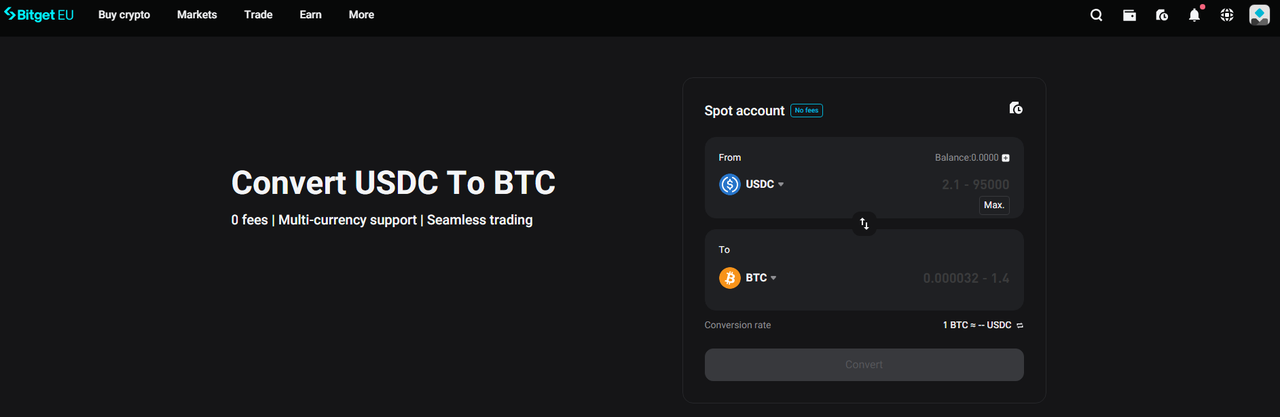
In the Convert page, use the
From field to select the cryptocurrency you currently hold and wish to exchange. Use the
To field to choose the target asset you want to receive. Simply click the dropdown arrow next to each ticker symbol to explore and select your preferred crypto pair.
Step 3: Enter the Amount and Confirm the Quote
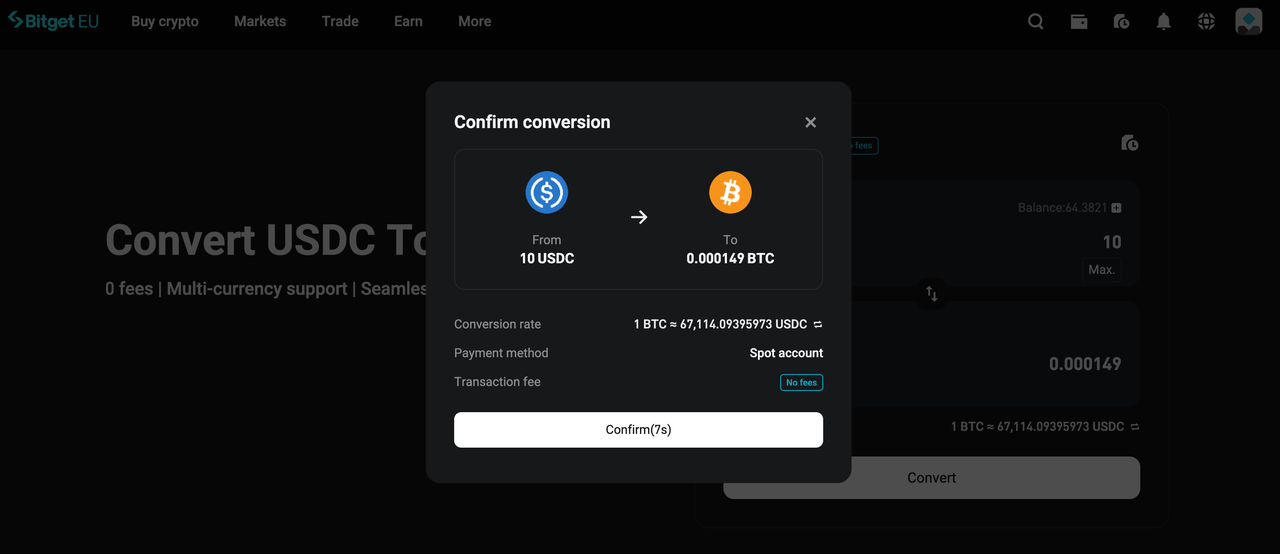
Enter the specific amount of cryptocurrency you wish to trade in the
From field. The algorithmic pricing engine will instantly generate a real-time quote. Click
[Preview] to review the final transaction details.
A confirmation window will appear displaying the exact exchange rate. Because cryptocurrency markets move quickly, you have an eight-second window to click
[Confirm] and lock in the quoted rate. If the timer expires, simply click
[Update quote] to refresh the price based on the latest market data.
Step 4: Instant Settlement
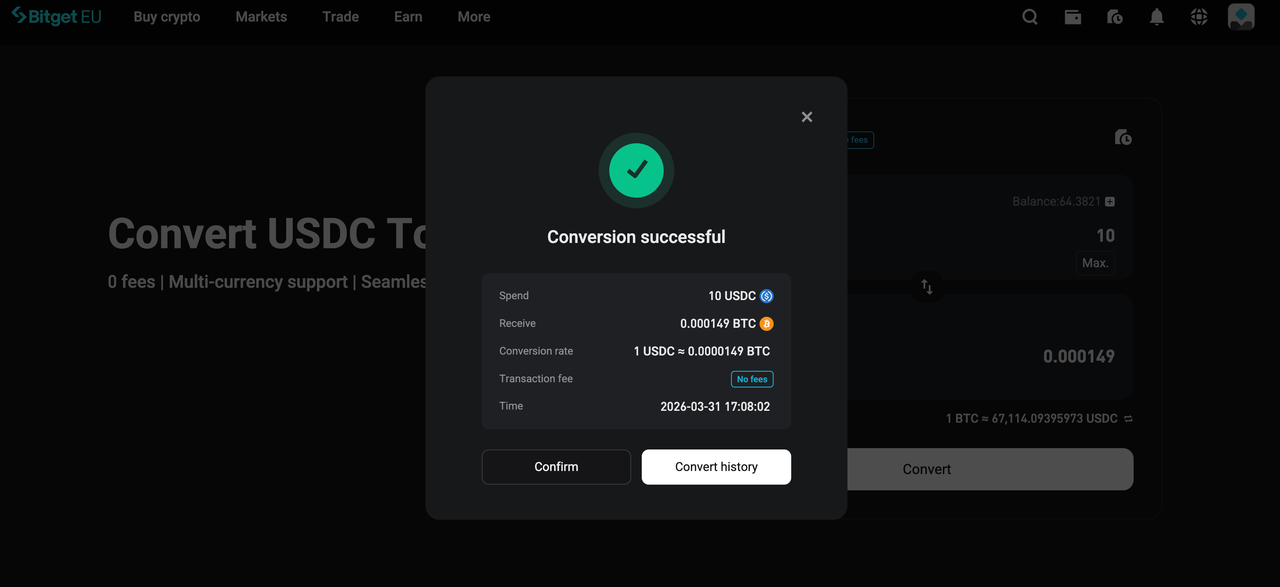
When you initiate a conversion, you receive a quoted exchange rate valid for a limited time. If you confirm the trade within the countdown timer, your order executes at that exact quoted rate. The converted assets will immediately be reflected in your Spot Account balance.
Troubleshooting: Common Issues and Quick Fixes
1. Why is my converted crypto not showing up?
Conversions on Bitget EU are designed to process instantaneously. If you do not see your new assets immediately, first refresh your Spot Account balance. In the rare event that the funds are still not visible, navigate to
Convert History to locate your specific Order ID, and contact
Bitget EU Customer Support for resolution.
2. Why does the exchange rate keep changing?
To protect users from market volatility, the Bitget EU Convert engine refreshes its rates six times every eight seconds to reflect real-time global liquidity. To prevent rate fluctuations, ensure you click
[Confirm] promptly within the eight-second window to lock in your quoted price.
3. Why am I unable to convert due to limit restrictions?
Transaction minimums and maximums vary depending on the specific crypto pair and current market liquidity. If you encounter a limit restriction, you can easily resolve this by adjusting your trade volume or executing the swap across a different trading pair.
4. Where can I get additional support?
If you require further assistance regarding how to trade or swap crypto in the EU, the Bitget EU customer service team is available 24/7. Reach out via the
official support portal for guidance.
The opinions expressed in this article are for informational purposes only. This article does not constitute an endorsement of any of the products and services discussed or investment, financial, or trading advice. Qualified professionals should be consulted prior to making financial decisions.
Share


Content
- What Is Bitget EU Convert?
- How To Swap Crypto With Bitget EU Convert: A Step-by-Step Guide
- Troubleshooting: Common Issues and Quick Fixes
Recommended
 The Uncensored Guide on How to Spot Trade on Bitget EU2026-05-22 | 5m
 Bitget EU VIP Premier Wealth Hub Introduction2026-05-25 | 5m
 How to Buy Crypto With a Credit/Debit Card on Bitget EU2026-05-22 | 5m
Up to 6200 USDC and LALIGA merch await new users!
Claim