
Beginner's guide
How to Buy Crypto With a Credit/Debit Card on Bitget EU
Beginner
2026-05-22 | 5m
If you are looking to purchase cryptocurrency using your credit or debit card, Bitget EU — a Regulated Crypto-Asset Service Provider (CASP) operating under MiCA in the European Union — allows you to do so directly. No wire transfers are required.
This guide walks you through how to buy crypto with a bank card on Bitget EU, what to expect at each stage, and what you need to know before you start.
Why Bitget EU Is the Go-To Platform for European Crypto Buyers
Before diving into the how-to, it's worth understanding why platform choice matters, especially in the EU.
Regulatory compliance is not optional in Europe. The Markets in Crypto-Assets Regulation (MiCA) framework sets the standards for operating a CASP within EU borders. Bitget EU operates in alignment with these standards.
For anyone searching for a Regulated Crypto-Asset Service Provider (CASP) in the EU that accepts card payments, Bitget EU offers:
✅ Regulatory compliance with EU financial standards
✅ KYC-verified onboarding
✅ Real-time exchange rates with transaction transparency
✅ Fiat deposit options for European users
✅ Support for both credit and debit card purchases
Understanding Fiat Deposits on Bitget EU
Before making your first card purchase, it's useful to understand what "fiat" means in this context. Fiat currency refers to government-issued legal tender — euros (EUR), US dollars (USD), or British pounds (GBP), for example. When you fund a crypto account using fiat, you convert traditional money into digital assets.
Bitget EU supports several fiat deposit methods:
|
Method
|
Description
|
|
Buy & Sell
|
Purchase or sell crypto at market rates
|
|
Recurring Buy
|
Automate regular crypto purchases at set intervals
|
Availability varies by country and region. Always check the deposit page within your Bitget EU account to confirm which options are accessible to you.
For the purposes of this guide, we focus on the most common method:
buying
crypto via credit or debit card.
How to Buy Crypto With a Credit or Debit Card on Bitget EU
Prerequisites: What You Need Before You Begin
To use the card purchase feature on Bitget EU, you must have the following in place:
-
A verified Bitget EU account: KYC (Know Your Customer) verification must be completed. This is a regulatory requirement for operating a crypto-asset service in the EU.
-
A bound email address: Your email must be linked to your Bitget EU account.
-
A bound phone number: Your mobile number must also be associated with your account for transaction authentication.
-
A valid credit or debit card: Ensure the physical card is on hand, as you'll need the card number, expiry date, and CVV during the setup process.
Once these are confirmed, you're ready to proceed.
Step 1: Access the Credit/Debit Card Purchase Page
Begin by navigating to the Bitget EU website and logging in to your account using your registered credentials.
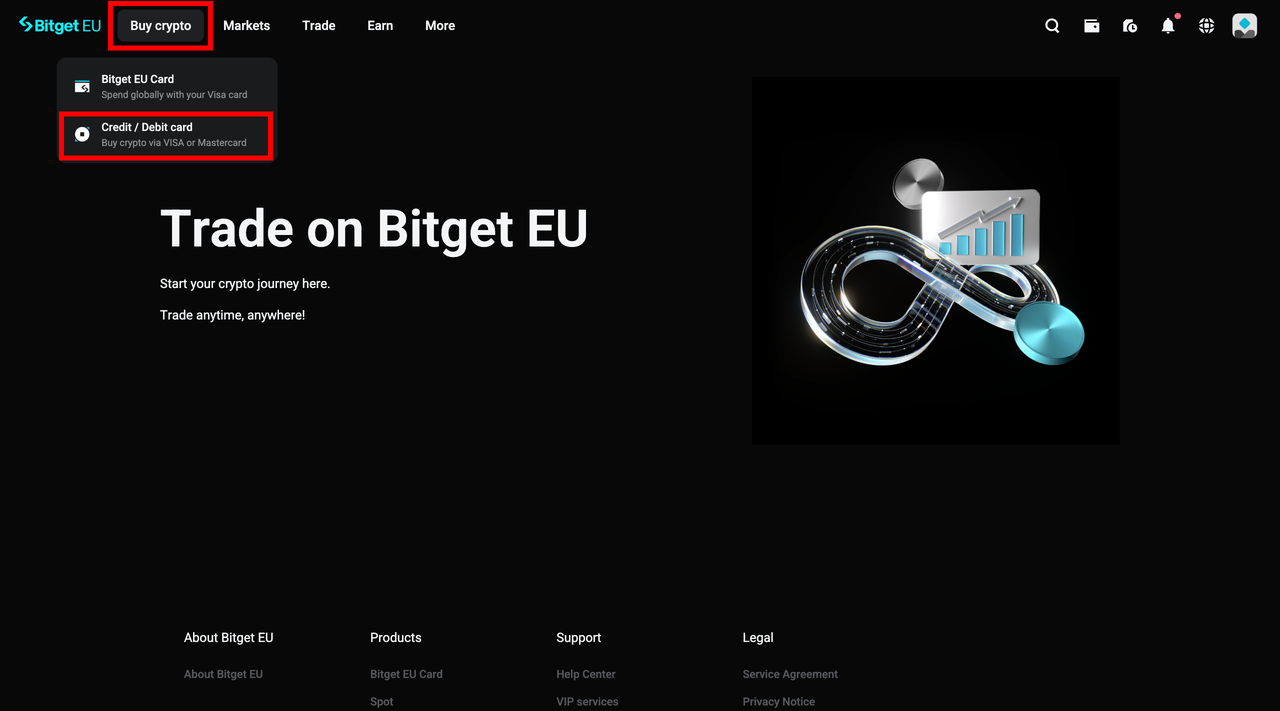
Once you're on the dashboard, locate the navigation bar at the top of the screen. Hover your cursor over the
Buy Crypto option. A dropdown menu will appear. From here, select
Credit / Debit Card.
This will take you to the card transaction interface, where you can manage both purchases and sales of cryptocurrency using your linked payment cards.
Step 2: Select Your Currency and Enter Your Amount
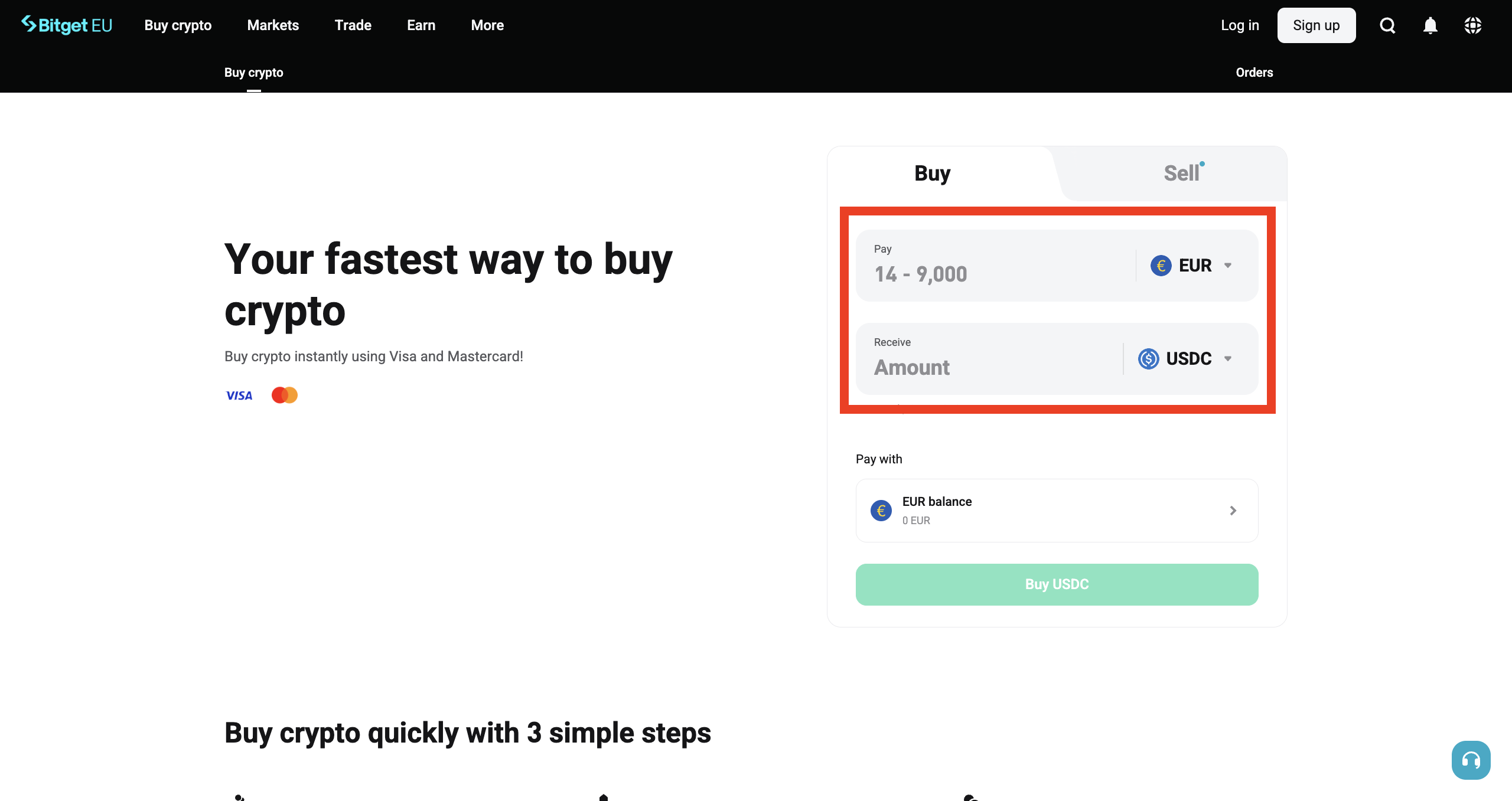
The card transaction page features two tabs: one for
Buy and one for
Sell. Choose the tab that reflects your intention — in this case,
Buy.
From here, you'll need to make two selections:
-
Fiat currency: Choose the currency you'll be paying with (e.g., EUR)
-
Cryptocurrency: Select the digital asset you want to receive (e.g., BTC, ETH, USDC)
Enter the amount you wish to spend or the amount of crypto you would like to receive. Bitget EU displays a real-time exchange rate, giving you visibility into the rate before you confirm.
Step 3: Select or Add Your Payment Card
Once your currency and amount are set, scroll down to the
Pay with section and click on the dropdown menu. Here, you will see any cards you have previously added to your account.
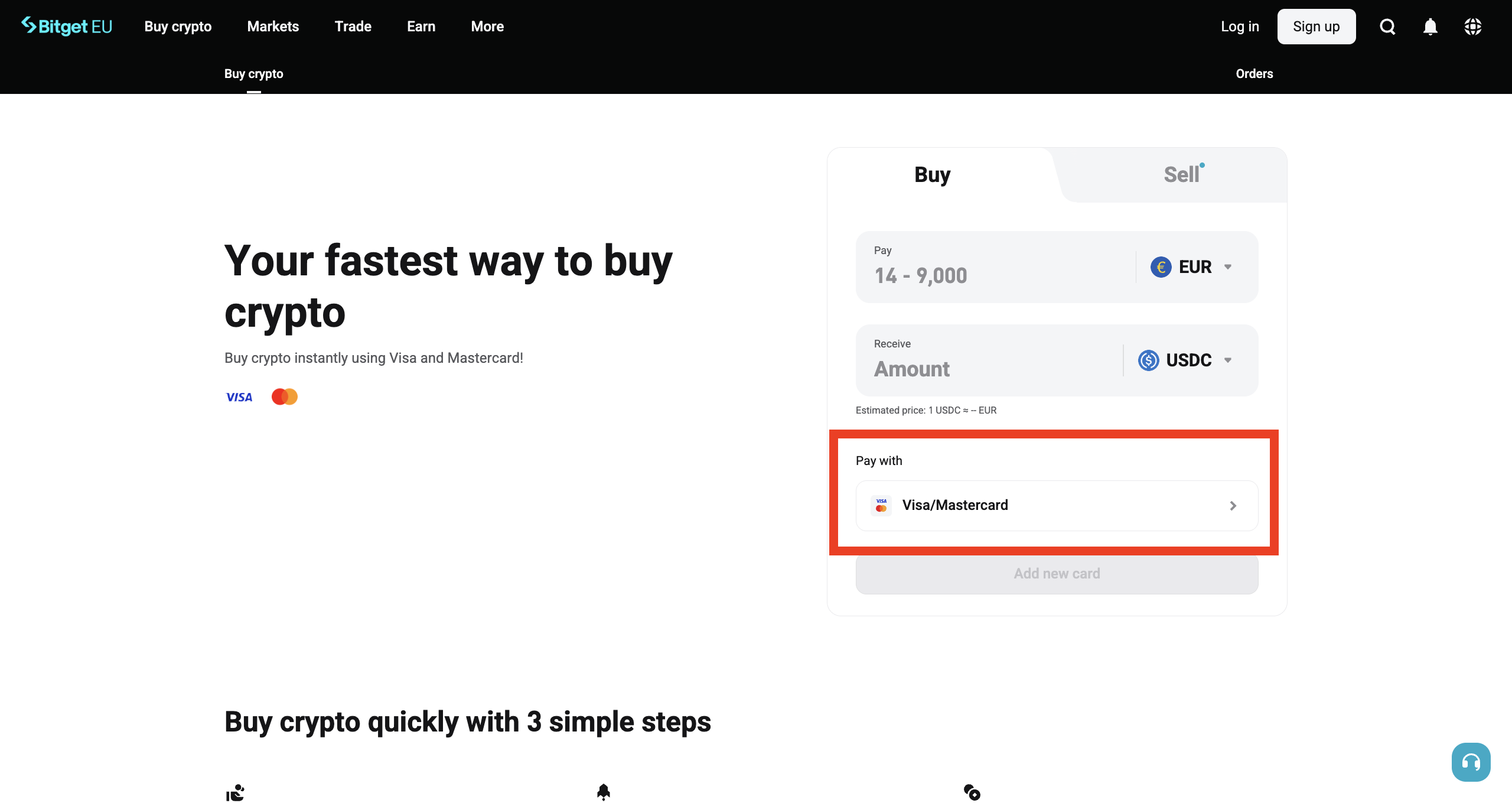
If this is your first time, or if you'd like to use a new card, click
[Card Management] to add or remove cards from your account. When adding a new card, you'll be prompted to enter:
-
Card number
-
Expiry date
-
CVV (Card Verification Value)
Important
:
Make sure you have your physical card with you during this step. These details must be entered accurately.
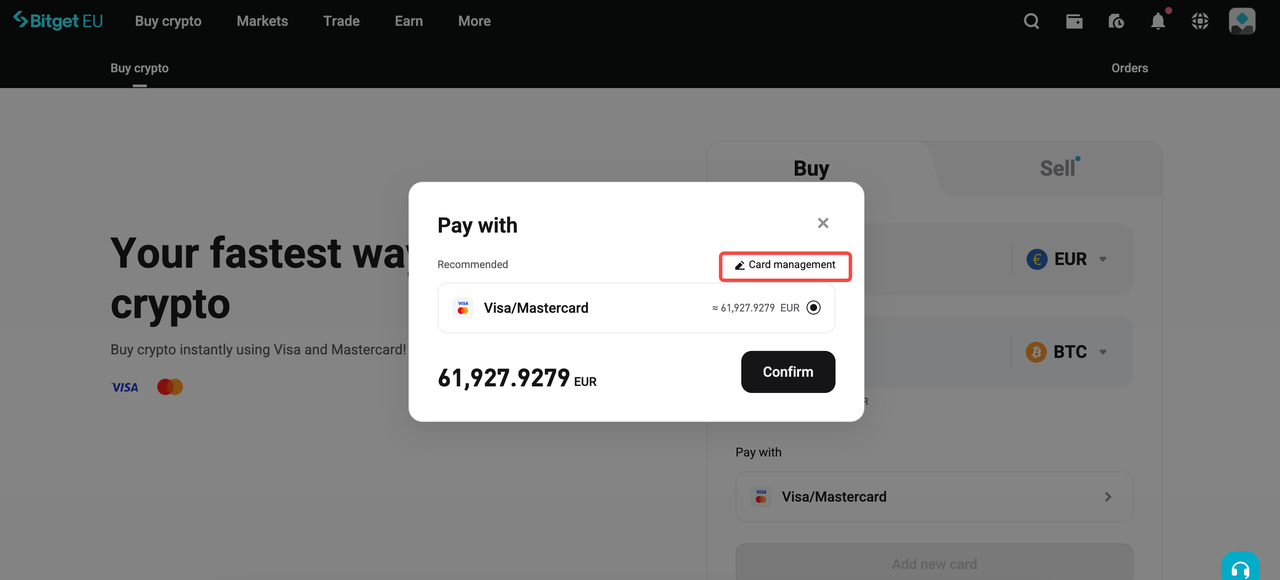
Once you've finished adding or selecting your preferred card, click
[Confirm] to proceed to the next step.
Step 4: Review Your Order and Complete the Payment
Before the transaction is finalised, Bitget EU presents a clear order summary showing:
-
The amount of fiat currency you will pay
-
The amount of cryptocurrency you will receive
-
The applicable exchange rate
Review these details carefully. If everything looks correct, confirm the order and follow the on-screen prompts to complete your payment.
Step 5: Wait for Payment Confirmation
After completing the payment, you'll see a "
Payment Pending" notification. Processing times can vary depending on network conditions and payment service providers, but most transactions are confirmed within a few minutes.
Do
NOT refresh or close the page until you receive confirmation that the payment has been processed.Doing so could interrupt the transaction and delay the crediting of funds to your account.
Once confirmed, the purchased cryptocurrency will appear in your Bitget EU account.
Key Things to Know About Card Purchases on Bitget EU
Fees and Charges
Transaction fees associated with card purchases are collected by the payment service provider, not by Bitget EU directly. These are standard processing charges imposed by the card network or payment gateway.
Always review the fee breakdown displayed before confirming your order.
Compliance
Bitget EU requires KYC verification, email binding, and phone number binding before allowing card transactions. These steps align with EU regulatory expectations for crypto-asset service providers.
Country and Region Availability
Not all fiat deposit methods or cryptocurrencies are available in every EU country. The platform is continuously expanding its offerings. Check the deposit page within your account to confirm what is available in your specific location.
Frequently Asked Questions
1. Which cryptocurrencies can I buy with a card on Bitget EU?
Bitget EU supports a range of digital assets for card purchases. The available options will be displayed in the cryptocurrency dropdown during checkout.
2. Are there limits on how much I can buy with a card?
Purchase limits may apply depending on your KYC verification level and the policies of the payment service provider. These limits are communicated during the checkout flow.
3. How long does it take for purchased crypto to appear in my account?
Most card transactions are processed and confirmed within a few minutes. In some cases, network conditions may cause slight delays.
4. Can I add multiple cards to my Bitget EU account?
Yes. The
Card Management section allows you to add, view, and remove multiple cards.
Final Thoughts
Buying crypto with a credit or debit card is a common method for European users to access digital assets. Bitget EU offers card payments within a regulated framework that aligns with EU standards.
Complete your KYC, link your card, and you're ready to go.
Log in to your Bitget EU account and
make your first purchase today
.
The opinions expressed in this article are for informational purposes only. This article does not constitute an endorsement of any of the products and services discussed or investment, financial, or trading advice. Qualified professionals should be consulted prior to making financial decisions.
Share


Content
- Why Bitget EU Is the Go-To Platform for European Crypto Buyers
- Understanding Fiat Deposits on Bitget EU
- How to Buy Crypto With a Credit or Debit Card on Bitget EU
- Key Things to Know About Card Purchases on Bitget EU
- Frequently Asked Questions
- Final Thoughts
Recommended
 The Uncensored Guide on How to Spot Trade on Bitget EU2026-05-22 | 5m
 Bitget EU VIP Premier Wealth Hub Introduction2026-05-25 | 5m
Up to 6200 USDC and LALIGA merch await new users!
Claim