Buy crypto
Beginner's guide
How to Complete KYC on Bitget EU: A Step-by-Step Guide for New Users

How to Complete KYC on Bitget EU: A Step-by-Step Guide for New Users

Beginner
2026-05-22 | 5m
Whether you are new to Bitget EU or returning to access full platform features, completing your Know Your Customer (KYC) verification is a required step. As a Regulated Crypto-Asset Service Provider (CASP) in the EU, Bitget EU maintains standards of financial compliance and data protection — and identity verification is a part of that commitment.
This guide walks you through every step of the Bitget EU KYC process clearly, concisely, and without unnecessary jargon. By the time you finish reading, you will know what to prepare, what to expect, and how to get verified.

What Is KYC and Why Does Bitget EU Require It?

KYC, or Know Your Customer, is a globally mandated process used by regulated financial institutions to verify the identity of their users. It is not optional. It is a legal obligation under the EU's Anti-Money Laundering Directives (AMLD) regulatory framework.
For users, completing KYC on Bitget EU delivers three core benefits:

Account Security

KYC serves as an additional verification layer, helping ensure that the account holder can access sensitive financial services.

Full Access to Bitget EU Services

Without completing identity verification, your account access is restricted. Once verified, you gain full access to:
  • Fiat and crypto deposits
  • Withdrawals to external wallets and bank accounts
  • Spot trading
  • All other platform features available under EU regulation

Regulatory Compliance

As a compliant platform operating under EU financial law, Bitget EU is required by regulators to verify user identities before facilitating financial transactions. Completing KYC ensures you remain in compliance with those regulations.

How Bitget EU Handles Your KYC: Powered by Sumsub

Bitget EU processes all identity verifications through Sumsub, an identity verification and compliance platform. Sumsub is used by regulated financial service providers globally and processes data in accordance with GDPR.
When you initiate KYC on Bitget EU, you will be redirected to a Sumsub-hosted verification environment. This process is encrypted and designed to handle your personal data. The entire KYC workflow — from document upload to facial recognition — is handled within Sumsub's infrastructure.

Before You Begin: What You Will Need

To avoid interruptions, gather the following before starting:
Requirement
Details
Valid government-issued ID
Passport, national ID card, driver's licence, or residence permit
Device with a working camera
Smartphone, laptop with webcam, or tablet
Stable internet connection
Required for document upload and facial verification
Registered phone number
For OTP (one-time password) verification
Registered email address
For notification receipt
Good lighting
Natural or artificial, no backlighting or shadows
Plain background
White or neutral for facial verification accuracy
⚠️ Critical Time Note : The entire KYC process must be completed within 15 minutes. If the session times out, you will need to restart from the beginning. Have everything ready before you begin.

Step-by-Step: How to Complete KYC on Bitget EU

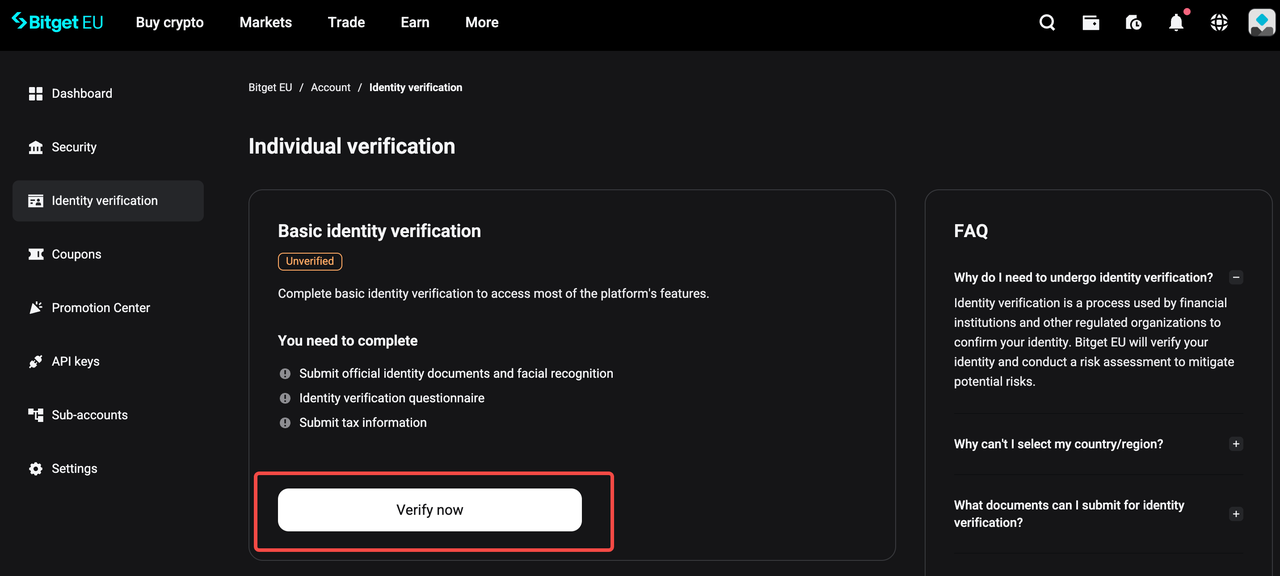
Step 1: Navigate to Identity Verification

1. Log in to your Bitget EU account via the official website.

2. Click on your profile icon in the top-right corner of the screen.

3. Select Identity verification from the dropdown menu.
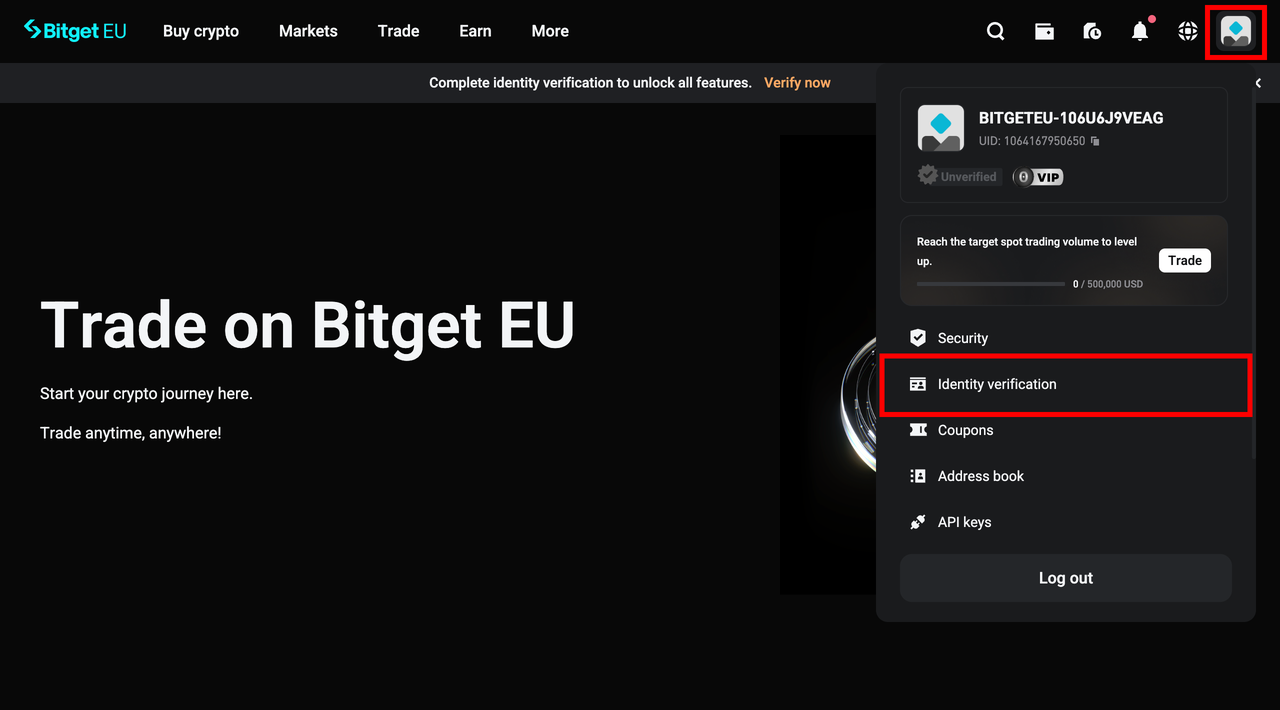
4. You will be taken to the Identity verification page. In the Individual verification section, click [Verify Now] to begin.
Step 2: Select Your Country and ID Type

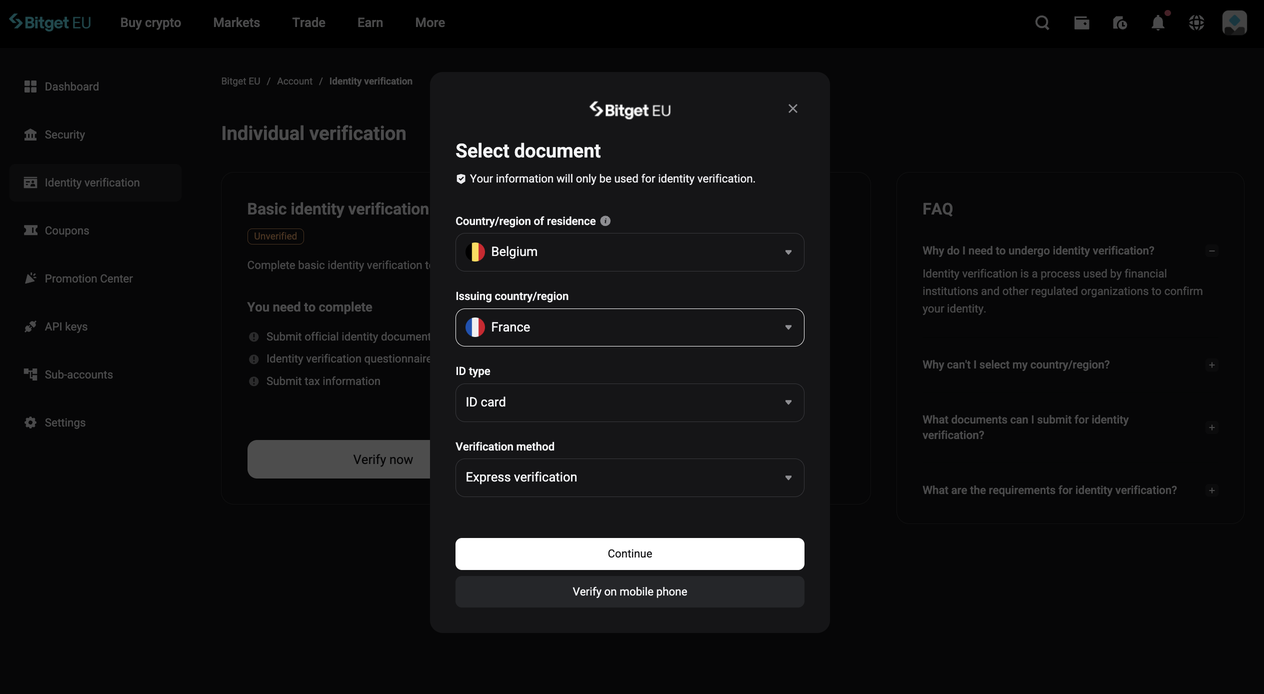
1. From the dropdown menus, select:
  • Your Country/Region of Residence
  • Your Issuing Country/Region (the country that issued your ID document)
2. Select your preferred ID Type. Accepted document types typically include:
  • Passport
  • National Identity Card
  • Driver's Licence
  • Residence Card
Note : Available ID types may vary depending on your country of residence.
3. Choose your preferred Verification Method:
Method
Description
Express Verification (Recommended)
Complete a qualified electronic signature quickly and securely online in minutes
Video Verification
A professional representative guides you through the process via live video call
4. Click [Continue] to proceed.

Step 3: Confirm the Legitimacy of the Sumsub Link
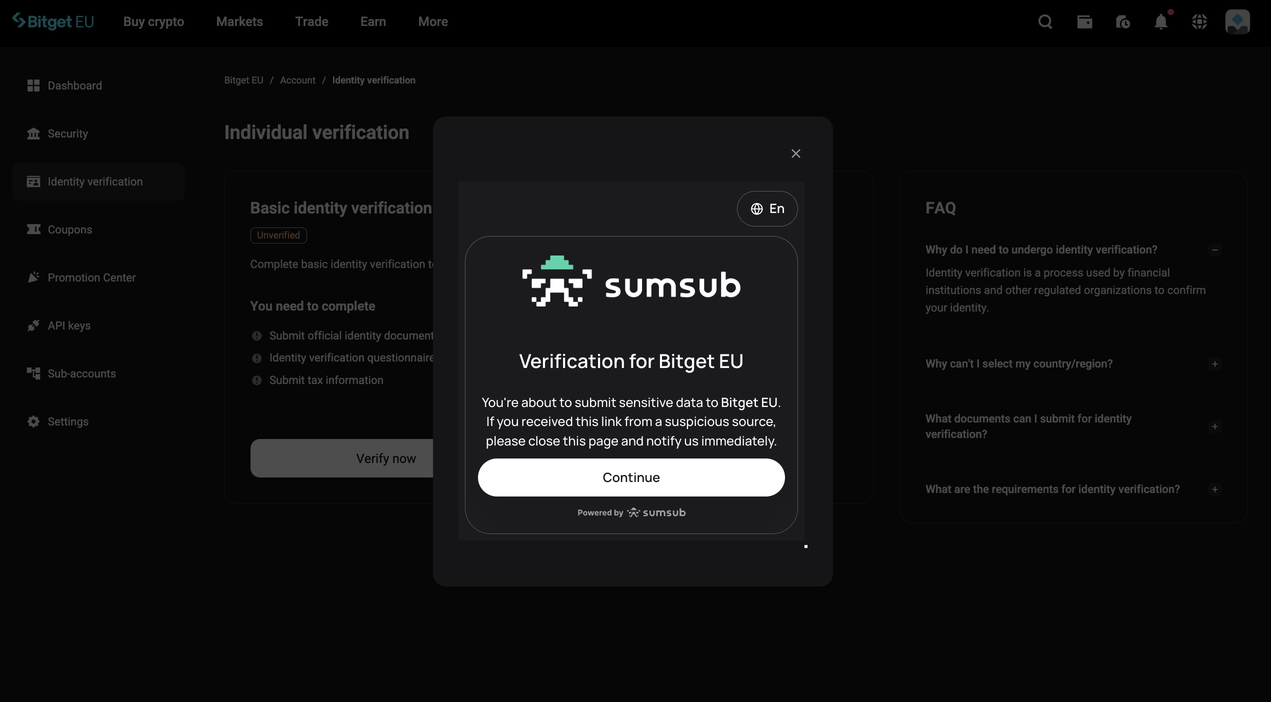
At this stage, you will see the following security notice from Sumsub:
"You're about to submit sensitive data to Bitget EU. If you received this link from a suspicious source, please close this page and notify us immediately."
This is a verification checkpoint. Only proceed if you initiate this verification yourself through the official Bitget EU website. If you receive this link via an unsolicited email, message, or third-party website, do NOT continue. Contact Bitget EU support immediately.
Once you confirm the link is legitimate, click [Continue].

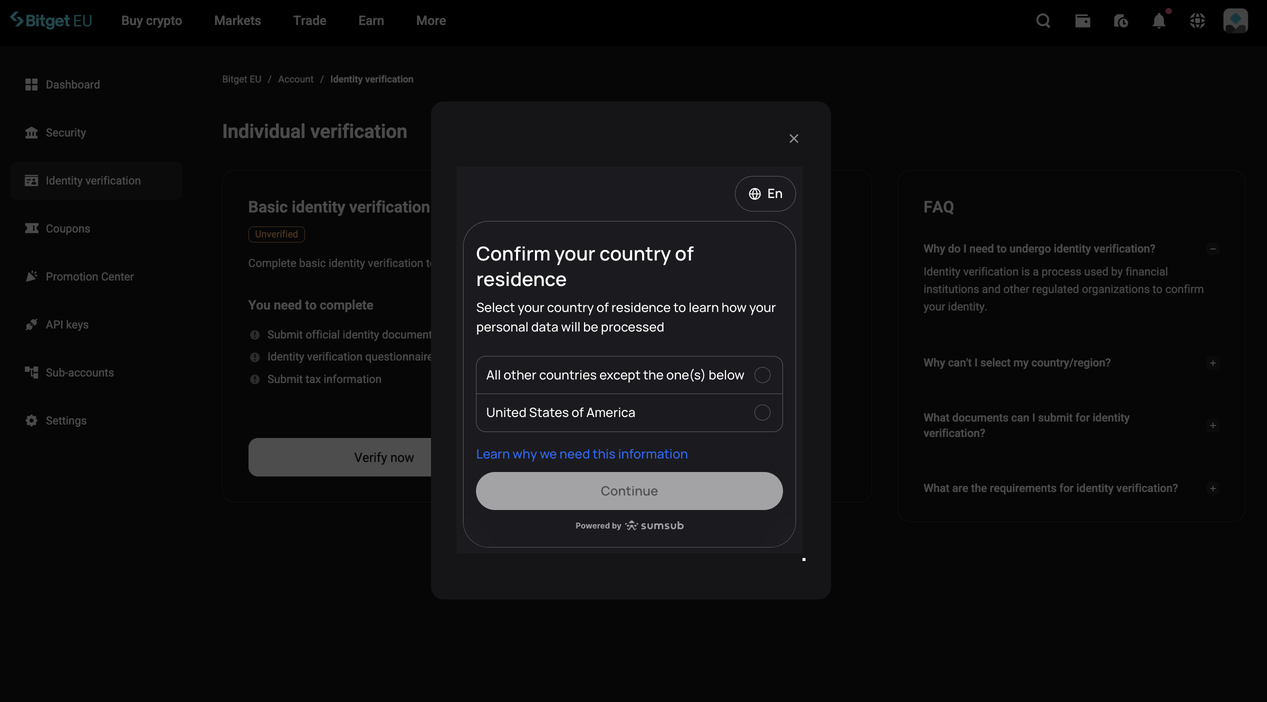
Step 4: Confirm Your Country of Residence

You will be prompted to select your country of residence. This step determines how your personal data, including biometric data collected during facial verification, is processed in accordance with applicable privacy regulations.
You will see two options:
  • All other countries (except those listed below)
  • United States of America
Select the option that applies to your situation and click [Continue].
Note : If you are a US resident, selecting "United States of America" triggers an additional consent step required by US biometric privacy law. Sumsub is legally obligated to obtain your explicit consent before processing biometric data from US residents.

Step 5: Upload Photos of Your Identity Document

You will now be asked to photograph both the front and back of your selected ID document.
Tips for a successful document upload:
  • Present your document flat on a well-lit, plain surface
  • Ensure all text, numbers, and photos on the document are sharp, legible, and fully visible within the frame
  • Avoid glare, shadows, or obstructions
  • Do not crop or digitally alter the image in any way
  • Enable camera access on your device when prompted
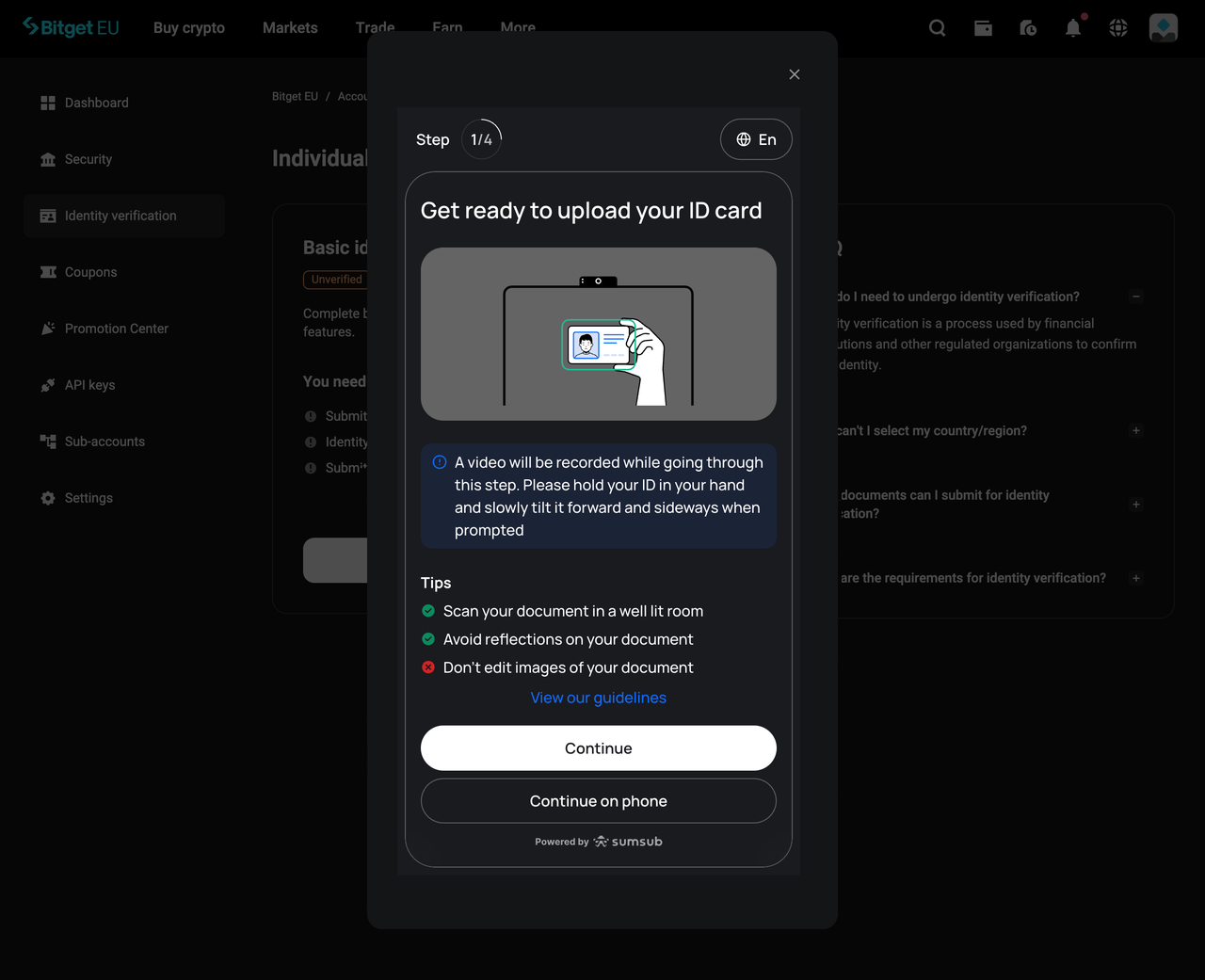
Once you are satisfied that both sides are clearly captured, click [Continue].

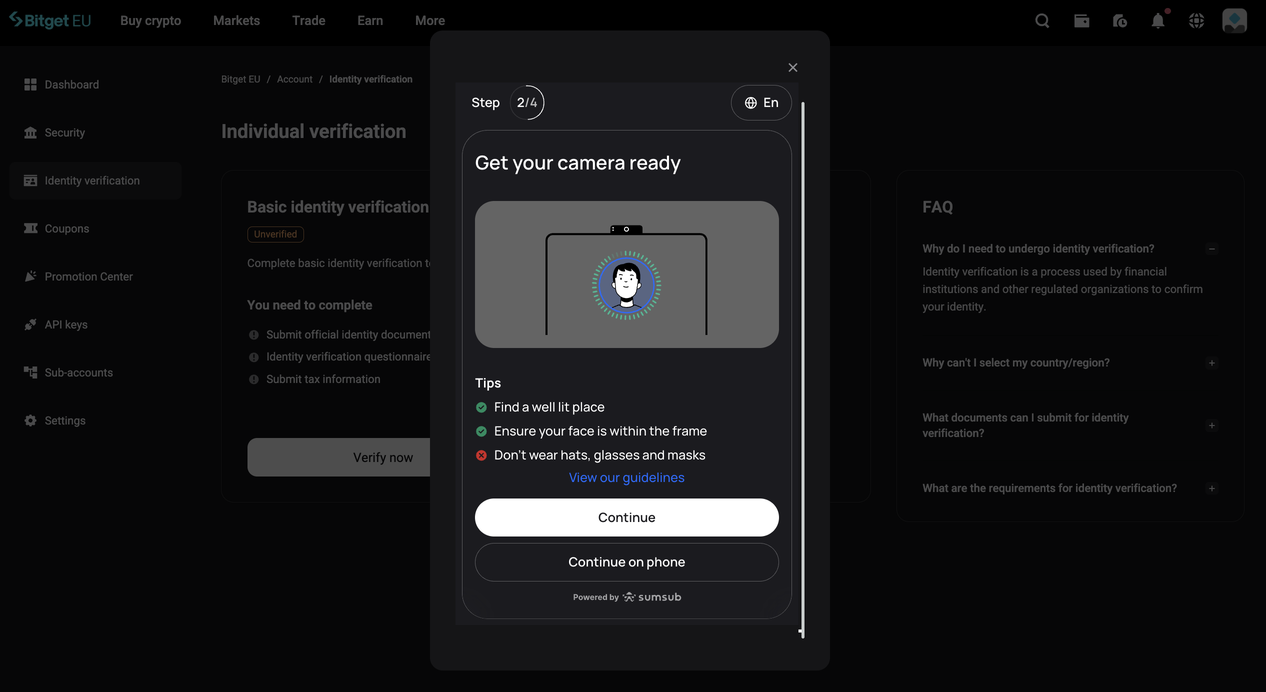
Step 6: Complete Facial Verification (Liveness Check)

This step uses Sumsub's liveness detection to confirm that you are physically present and match the photo on your submitted ID document.
Follow the on-screen prompts carefully. You may be asked to:
  • Turn your head slowly to the left or right
  • Hold a neutral expression while facing the camera directly
Best practices for facial verification:
  • Use a plain white or neutral background
  • Ensure you are in a well-lit environment; avoid windows or light sources directly behind you
  • Remove hats, sunglasses, heavy-framed glasses, or any accessories that cover your face
  • Keep your face centred in the frame throughout the process
  • Avoid making exaggerated expressions

Step 7: Enter Your Contact Details
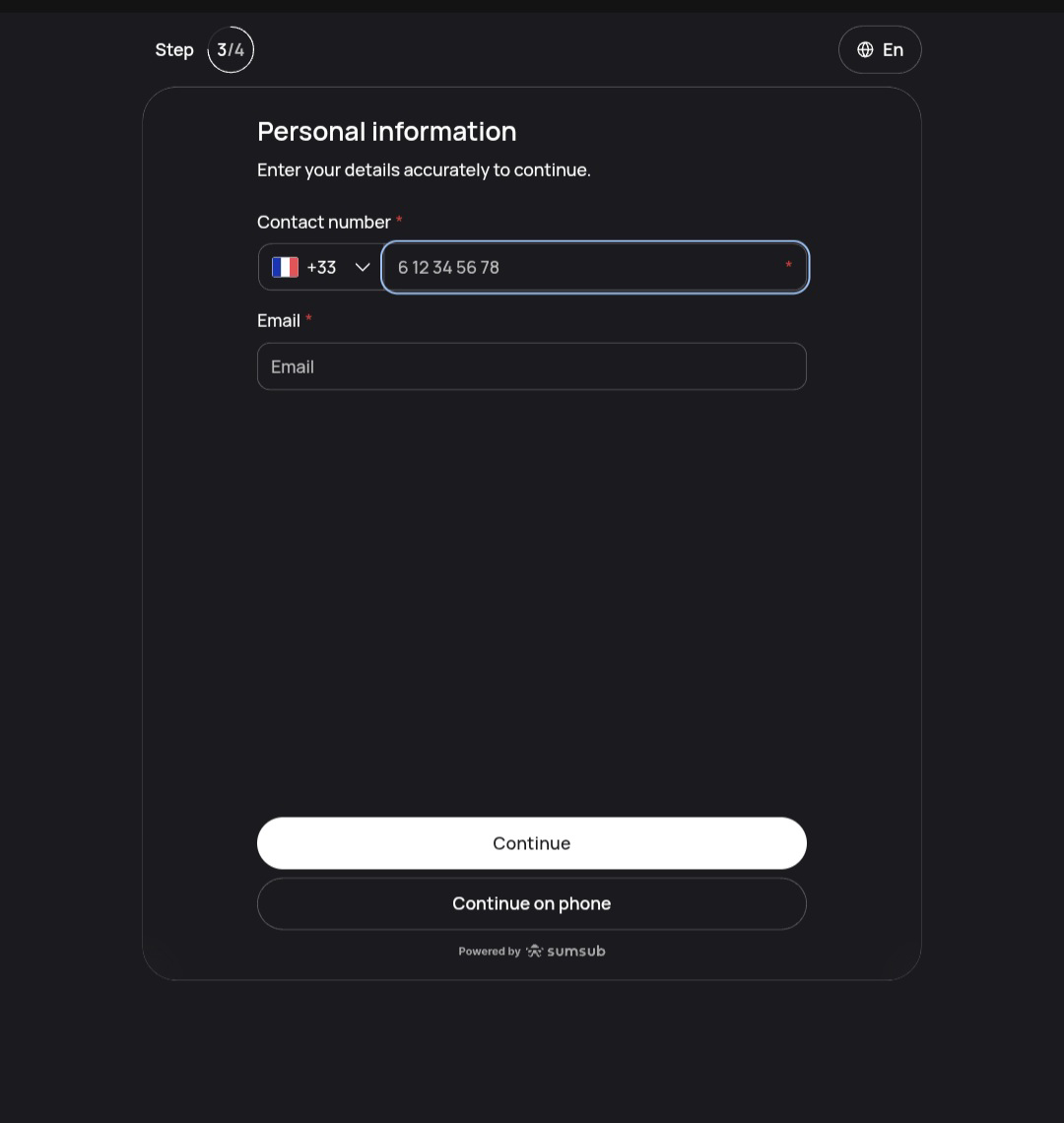
Enter your registered phone number and registered email address into the corresponding fields and click [Continue].
These must match the contact details associated with your Bitget EU account.

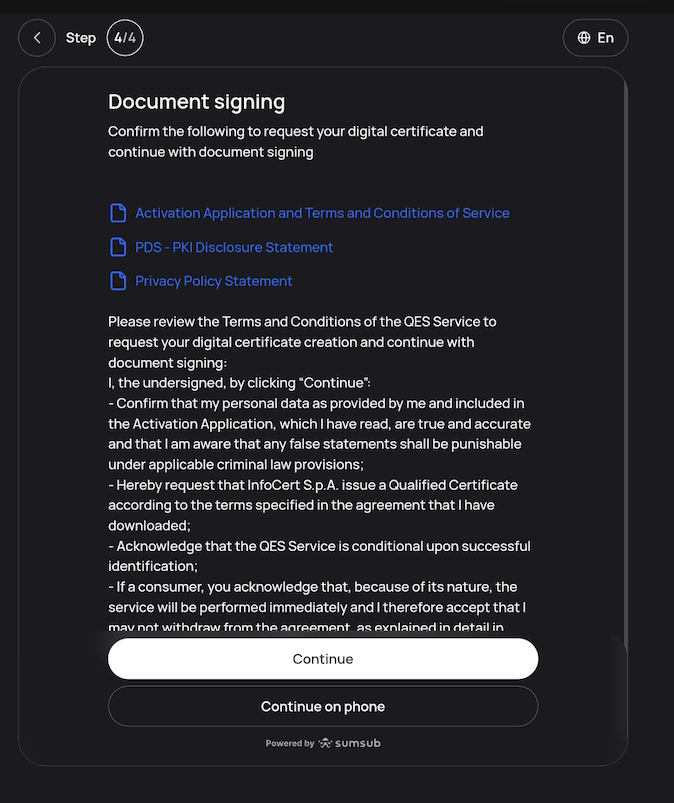
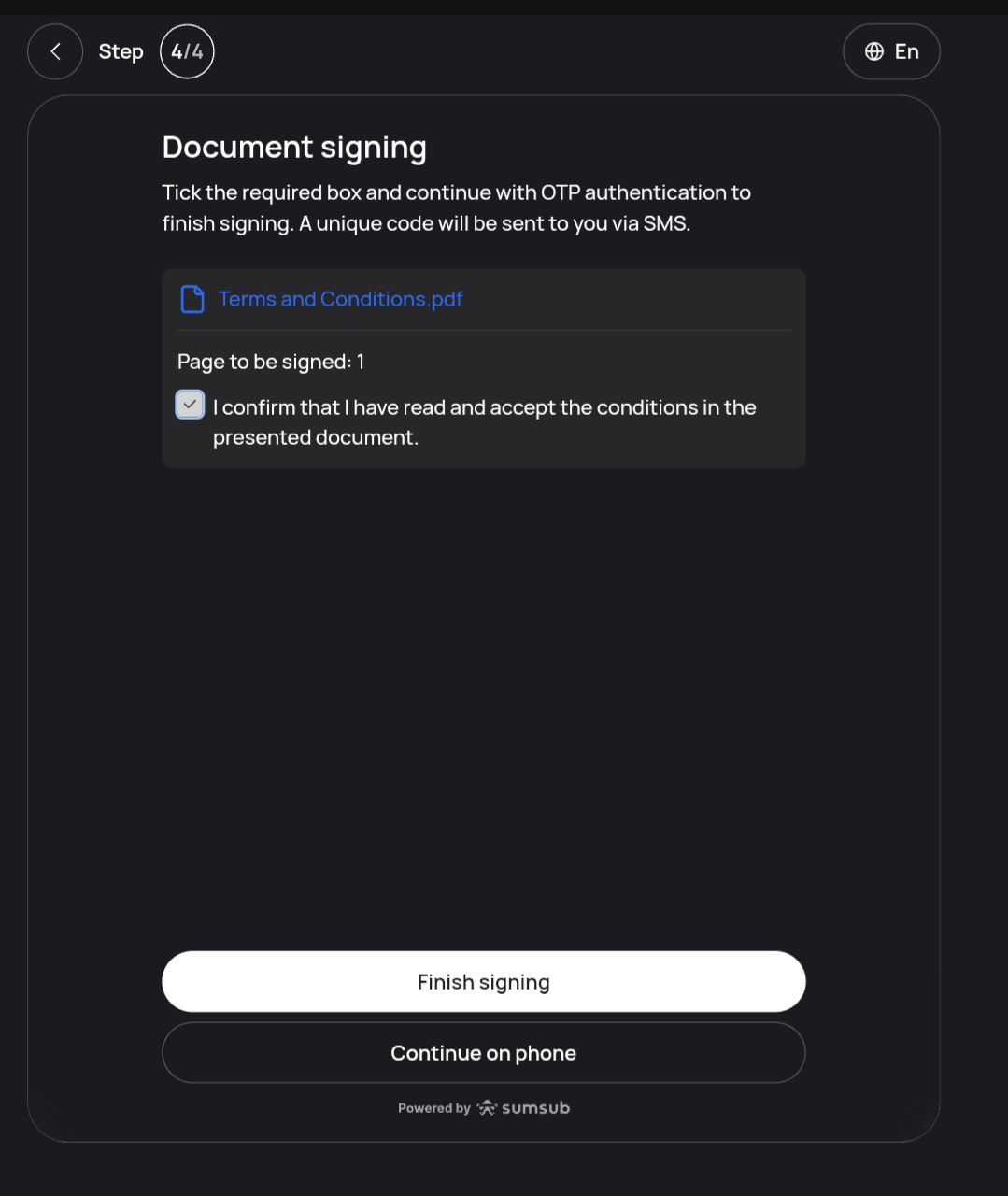
Step 8: Sign the Required Documents

You will be presented with legal and compliance documentation to review and sign digitally as part of the qualified electronic signature process.

1. Read through the presented documents carefully.

2. Tick the confirmation box: "I confirm that I have read and accept the conditions in the presented document."

3. Click [Finish Signing] to proceed.

You may be asked to review and electronically sign required legal/compliance documents. This helps ensure we can provide services and complete onboarding in line with applicable requirements.
Step 9: Enter the OTP Sent to Your Phone
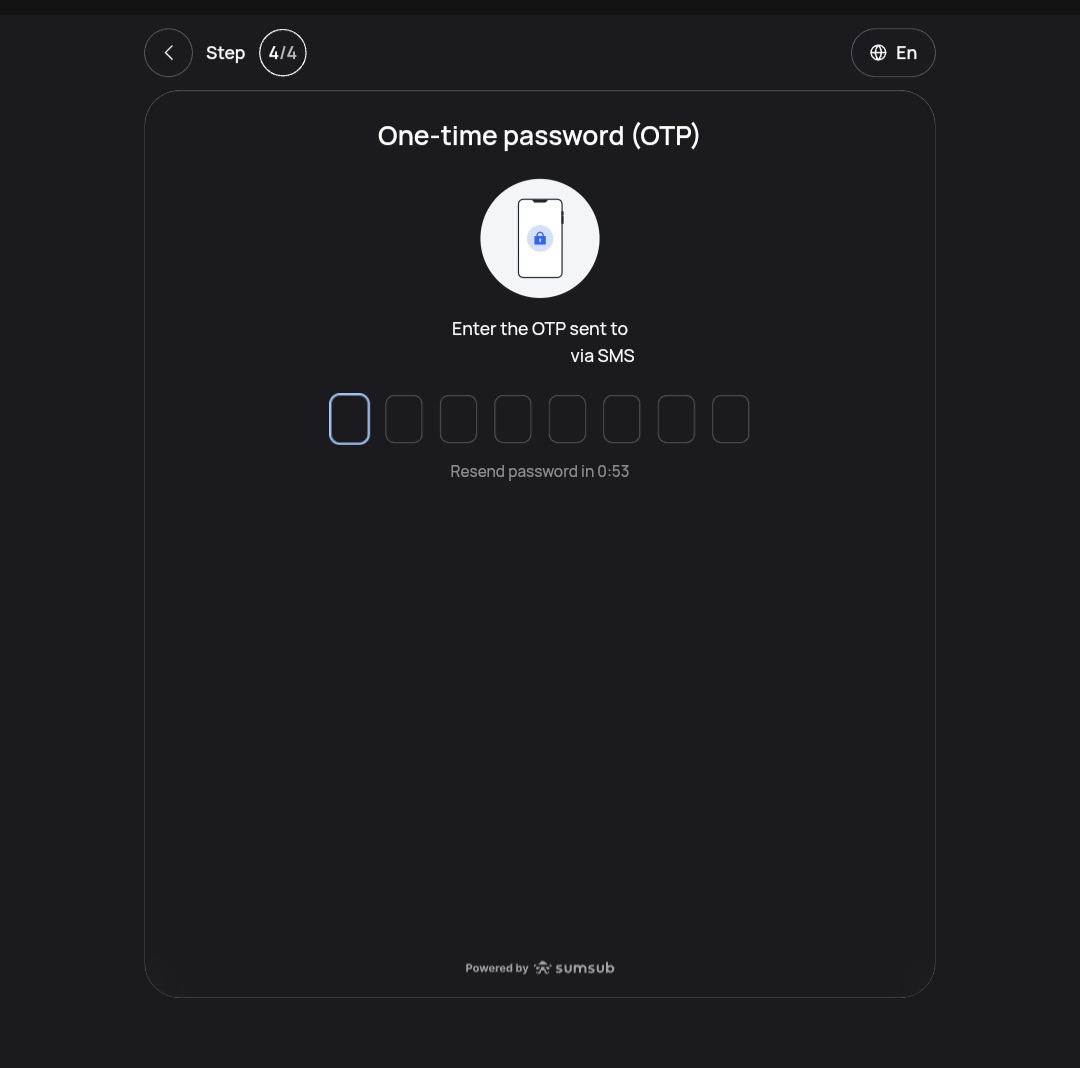
A one-time password (OTP) will be sent to your registered phone number. Enter this code in the field provided to confirm your identity and complete the verification submission.
Once entered correctly, your KYC application will be submitted for review.

What Happens After You Submit?

After completing all steps:
  • Your account status will be updated to "Under Review"
  • You will receive an email notification once your verification is approved, or if any additional information is required
  • Processing typically takes 1 business day
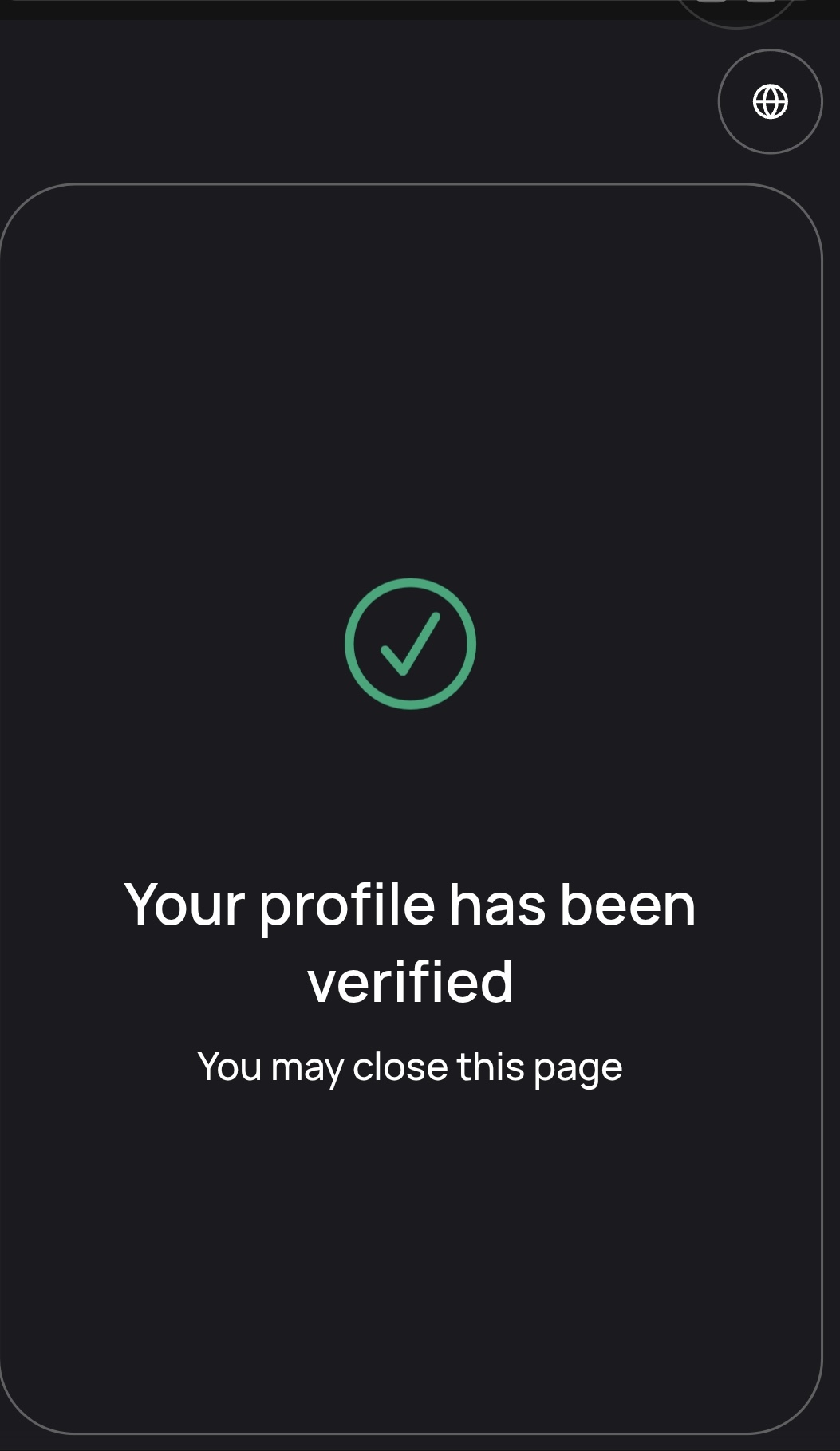
If your verification is approved, the Sumsub page associated with your KYC session will display as follows:

No Camera on Your Computer? Here's What to Do
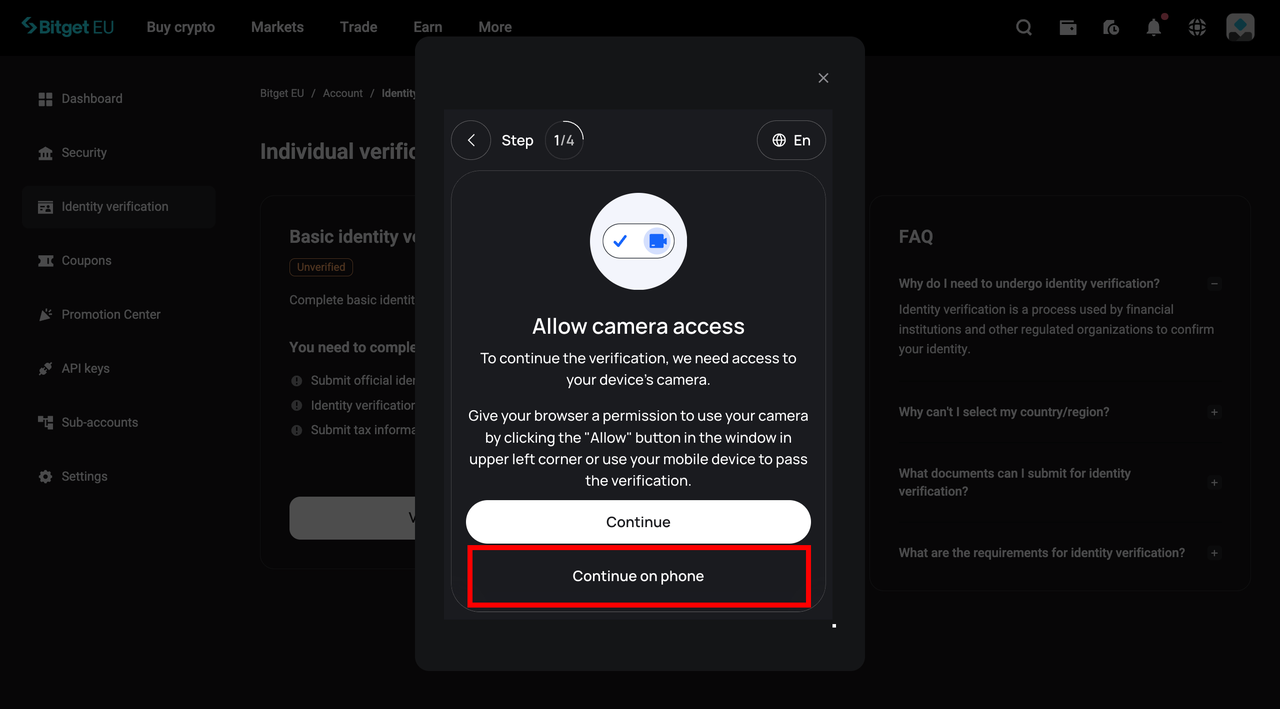
If you are completing KYC on the Bitget EU website but your computer does not have a working camera, you do not need to switch devices entirely.
When prompted for document or facial scanning:
1. Click [Continue on Phone]

2. A QR code will appear on your screen
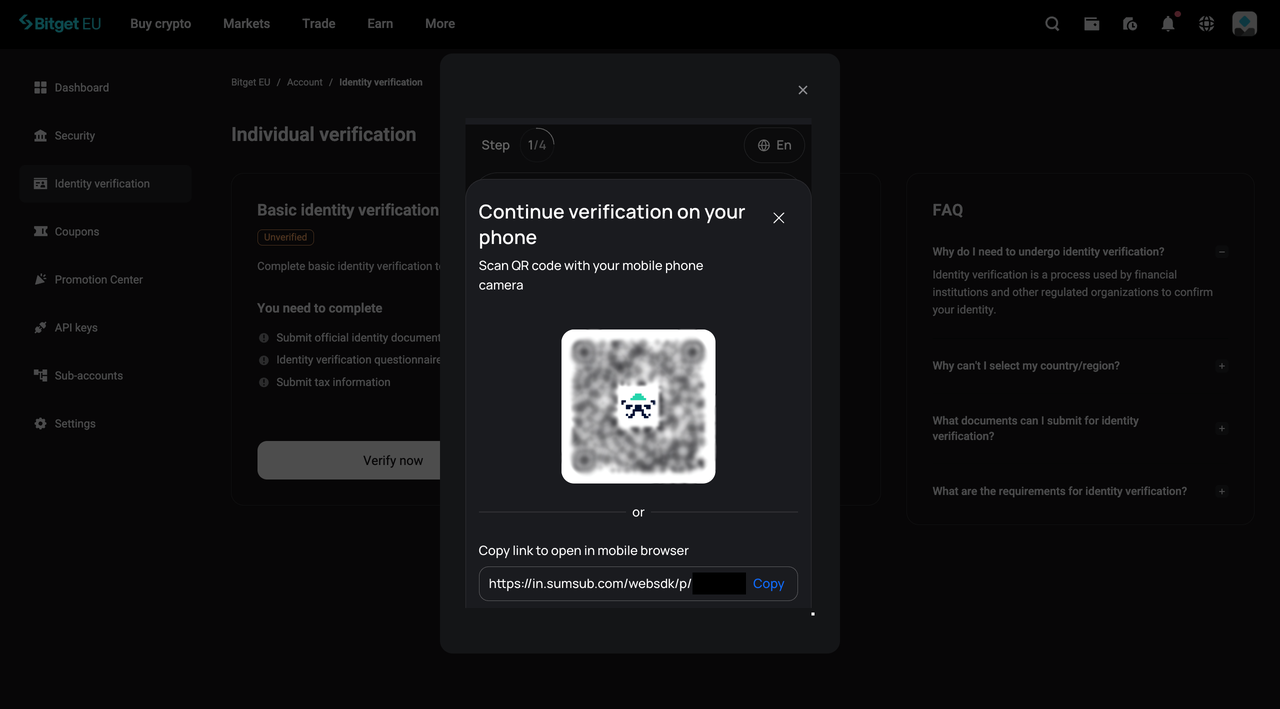
3. Open your smartphone camera and scan the QR code
4. Your phone will open a session-linked continuation of the KYC process
5. Complete the remaining steps on your phone

Your desktop session and mobile session are linked.

KYC Tips for First-Time Applicants

To help your verification complete smoothly:
  • Use a valid, unexpired government-issued ID
  • Ensure your document has at least 6 months of validity remaining
  • Complete all steps in a single uninterrupted session within the 15-minute window
  • Use a high-resolution camera; blurry document images are a leading cause of rejection
  • Avoid submitting photographs of photographs; always use the original physical document

Frequently Asked Questions (FAQs)

1. How do I check the status of my KYC application on Bitget EU?

Log in to your Bitget EU account and navigate to the Identity verification page via your profile icon. Your current verification status will be displayed there.

2. What should I do if my verification takes longer than 1 business day?

If 24 hours have passed and your application is still marked as "Under Review", contact Bitget EU Live Chat Support directly. Have your User ID (UID) ready when you reach out, as this will allow the support team to locate your application and assist you.

3. What happens if my KYC application is rejected?

You will receive an email explaining the specific reason for the rejection. Common reasons include:
  • Blurry or incomplete document images
  • Expired identification document
  • Mismatch between account details and submitted ID
  • Poor lighting during facial verification
Review the feedback, correct the identified issues, and reapply following the steps in this guide.

4. Is my personal data safe during the KYC process?

Yes. Bitget EU uses Sumsub to support identity verification. Your data is encrypted and processed in accordance with applicable data protection laws. For details on data sharing and retention, see our Privacy Notice.

5. What is the difference between Express Verification and Video Verification?

Express Verification involves uploading your documents and completing a liveness check entirely online in just a few minutes with no scheduling required.
Video Verification connects you with a live compliance representative via video call who guides you through the process. This option may be preferred by users who require additional support or whose document types may require human review.

Final Thoughts

The KYC process on Bitget EU is a required step for a compliant crypto trading experience in Europe. By verifying your identity, you are fulfilling a regulatory requirement while accessing the full range of platform features.
Bitget EU is a Regulated Crypto-Asset Service Provider operating in the EU that prioritises compliance.
Follow the steps in this guide, come prepared, and your KYC can be completed in minutes (though some applications may require additional review).
Welcome aboard.
For further assistance, contact Bitget EU customer support on the Bitget EU website.
The opinions expressed in this article are for informational purposes only. This article does not constitute an endorsement of any of the products and services discussed or investment, financial, or trading advice. Qualified professionals should be consulted prior to making financial decisions.
Share
link_icontwittertelegramredditfacebooklinkend
Content
  • What Is KYC and Why Does Bitget EU Require It?
  • How Bitget EU Handles Your KYC: Powered by Sumsub
  • Before You Begin: What You Will Need
  • Step-by-Step: How to Complete KYC on Bitget EU
  • What Happens After You Submit?
  • No Camera on Your Computer? Here's What to Do
  • KYC Tips for First-Time Applicants
  • Frequently Asked Questions (FAQs)
  • Final Thoughts
Up to 6200 USDC and LALIGA merch await new users!
Claim
© 2026 Bitget EU
Cookie Preference Center