
Beginner's guide
How to Deposit Crypto in the EU: A Step-by-Step Guide for Bitget EU, a Regulated Crypto Exchange
How to Deposit Crypto in the EU: A Step-by-Step Guide for Bitget EU, a Regulated Crypto Exchange
Beginner
2026-05-22 | 5m
As the European digital asset landscape matures, choosing a secure and compliant trading platform is essential for both institutional and retail investors. If you are looking for a premier regulated crypto-asset service provider, Bitget EU offers a secure, transparent, and user-friendly environment for managing digital assets.
This guide explains how to deposit cryptocurrency from external wallets and exchanges into your Bitget EU account. It also covers Travel Rule compliance requirements for deposits under Regulation (EU) 2023/1113.
Deposit to Bitget EU From a Web3 Crypto Wallet
If you already have a Web3/crypto wallet (e.g. MetaMask, Trust Wallet, Ledger), follow these steps to deposit crypto into your Bitget EU account.
⚠️ Note: You must complete KYC / identity verification to make withdrawals later. However, there are no restrictions on deposits — you can fund your account right away.
Step 1: Open the Deposit Page
-
Log in to your Bitget EU account.
-
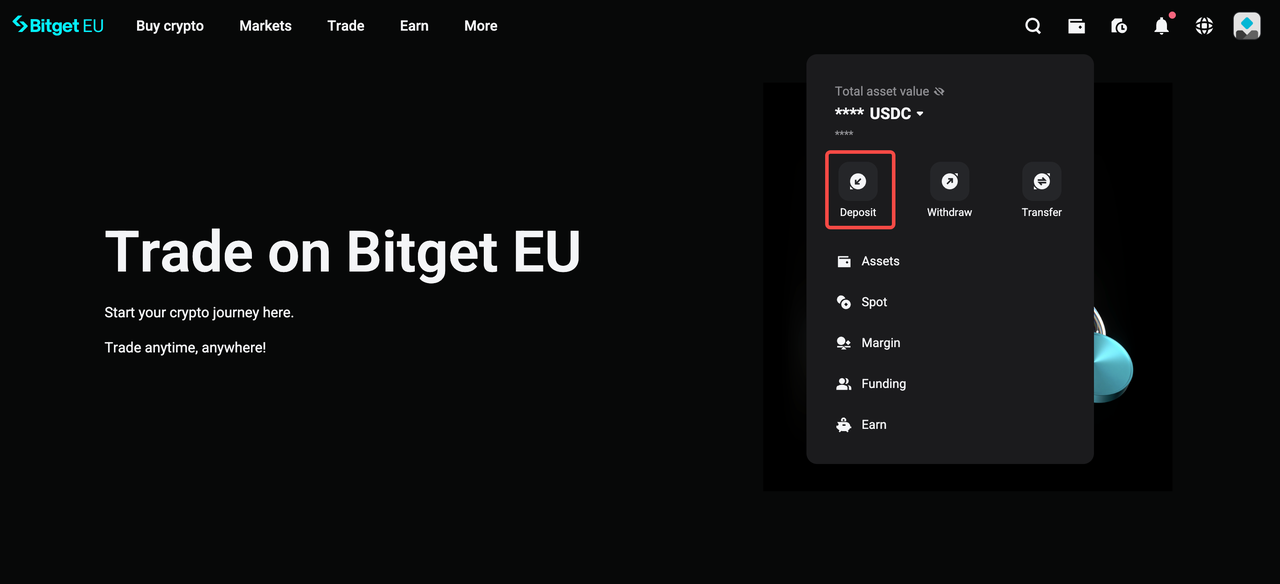
Hover over the wallet icon on the navigation bar and click [Deposit].
Step 2: Select Your Asset and Network
-
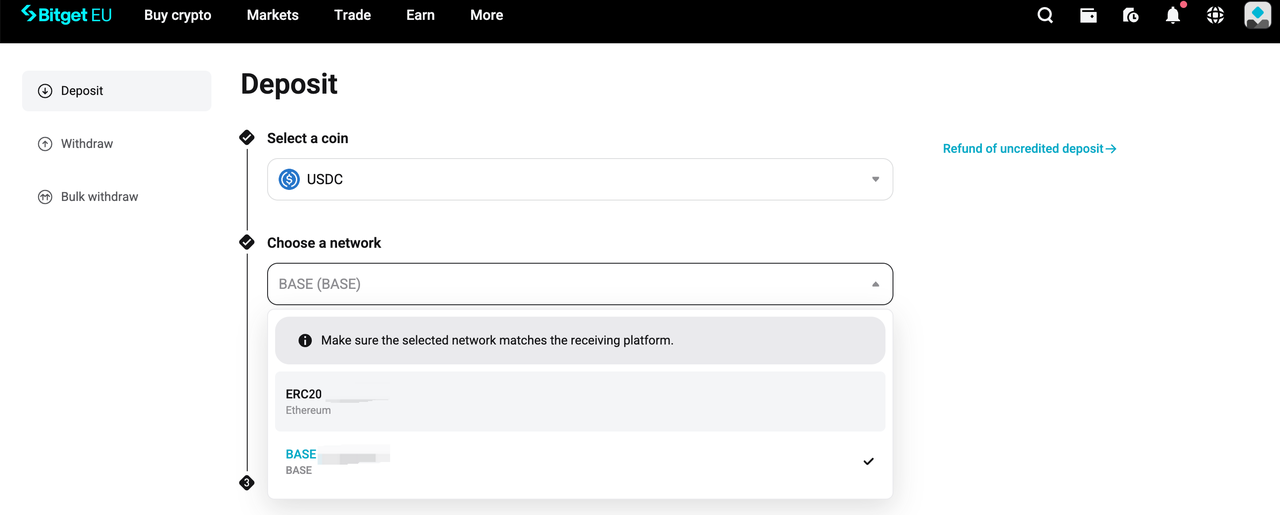
Select the cryptocurrency you want to deposit.
-
Choose the deposit network (e.g. ERC20, BEP20, TRC20).
-
Your Bitget EU deposit address will be displayed as both a QR code and a copyable address.
-
Choose your destination account: Spot Account (for spot trading) or Funding Account.
⚠️
Important:
-
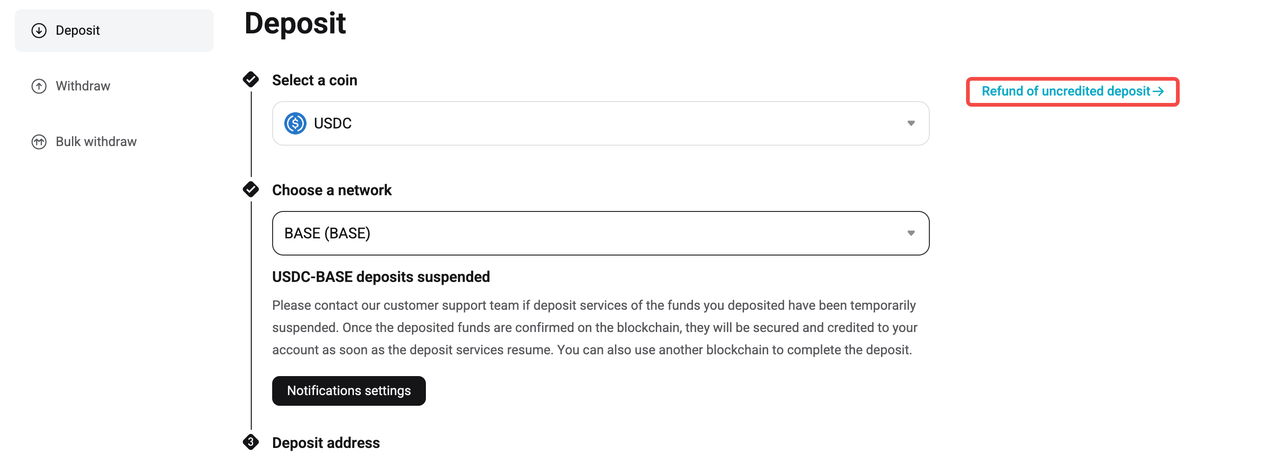
Minimum deposit amount: 0.001 USD C. Deposits below this threshold will not be credited or refunded.
-
Ensure the network you select matches the network used by your sending wallet.
Step 3: Transfer Funds From Your Wallet
-
Open your Web3 wallet and tap [Send].
-
Select the same network and token you chose on Bitget EU.
-
Copy your Bitget EU deposit address and paste it into your wallet, or scan the QR code.
-
Enter the amount and confirm the transaction.
⚠️
Important:
-
Network mismatch = lost funds. Sending assets to a different network from the deposit address means your funds will not arrive. Contact support immediately if this happens.
-
Gas fees: Blockchain transactions require gas fees in the native currency of the blockchain (ETH for Ethereum, BNB for BNB Chain, etc.). Ensure your wallet has sufficient gas.
Step 4: Check Your Deposit History
After sending, go to the deposit page and check the
Deposit History section.
⚠️
Note: Processing time depends on network congestion, not Bitget EU. Some networks confirm in seconds; others may take 10+ minutes during busy periods.
Deposit to Bitget EU From Another Exchange (VASP)
You can also deposit crypto directly from another exchange (e.g. Binance, Cryptobase, Kraken) into your Bitget EU account.
Step 1: Copy Your Bitget EU Deposit Address
Follow the same steps as above: go to
[Deposit] on Bitget EU, select your asset and network, then copy the deposit address or QR code.
Step 2: Withdraw From Your Exchange
-
Log in to the source exchange.
-
Go to [Withdraw] and paste your Bitget EU deposit address or scan the QR code.
-
Select the same network as your Bitget EU deposit address.
-
Enter the token and amount and confirm.
⚠️
Important:
-
Always double-check the network match between the two exchanges.
-
Some exchanges may require a Memo/Tag for certain cryptocurrencies (e.g. XRP, XLM). Make sure to copy it if required.
Step 3: Confirm Deposit on Bitget EU
Once the transaction is confirmed on the blockchain, the funds will appear in your Bitget EU account. Check
Deposit History for the status.
Understanding the EU Crypto Travel Rule for Deposits
What is the Travel Rule?
The Travel Rule is a regulatory framework established by the Financial Action Task Force (FATF), which requires Virtual Asset Service Providers (VASPs) to collect, verify, and transmit specific customer data during digital asset transfers. This rule aims to combat money laundering and terrorist financing by ensuring transparency in financial transactions.
As a regulated CASP in Europe, Bitget EU operates in strict compliance with Regulation (EU) 2023/1113. We fully enforce Travel Rule protocols across all cryptocurrency deposits and withdrawals to provide a legally compliant trading environment.
For a better understanding of this policy, please read
FAQ - Understanding the Travel Rule Requirements
.
Who Is Affected by These Regulations?
If you are a registered Bitget EU user, the Travel Rule applies to your transaction activity. Specifically, you may be required to provide supplementary sender or recipient information when receiving cryptocurrency deposits from any external source. This includes transfers originating from:
-
Self-hosted or private wallets (e.g., MetaMask, Ledger, Trust Wallet)
-
Other regulated cryptocurrency exchanges or third-party VASPs
How It Works: The Compliant Deposit Flow
Navigating this regulatory requirement is built seamlessly into the Bitget EU user experience.
To ensure your funds are credited without unnecessary delays, here is exactly how the Travel Rule integrates with our standard crypto deposit process:
Step 1: Select the deposit source
Choose whether the deposit comes from a
VASP (exchange) or a
Private Wallet.
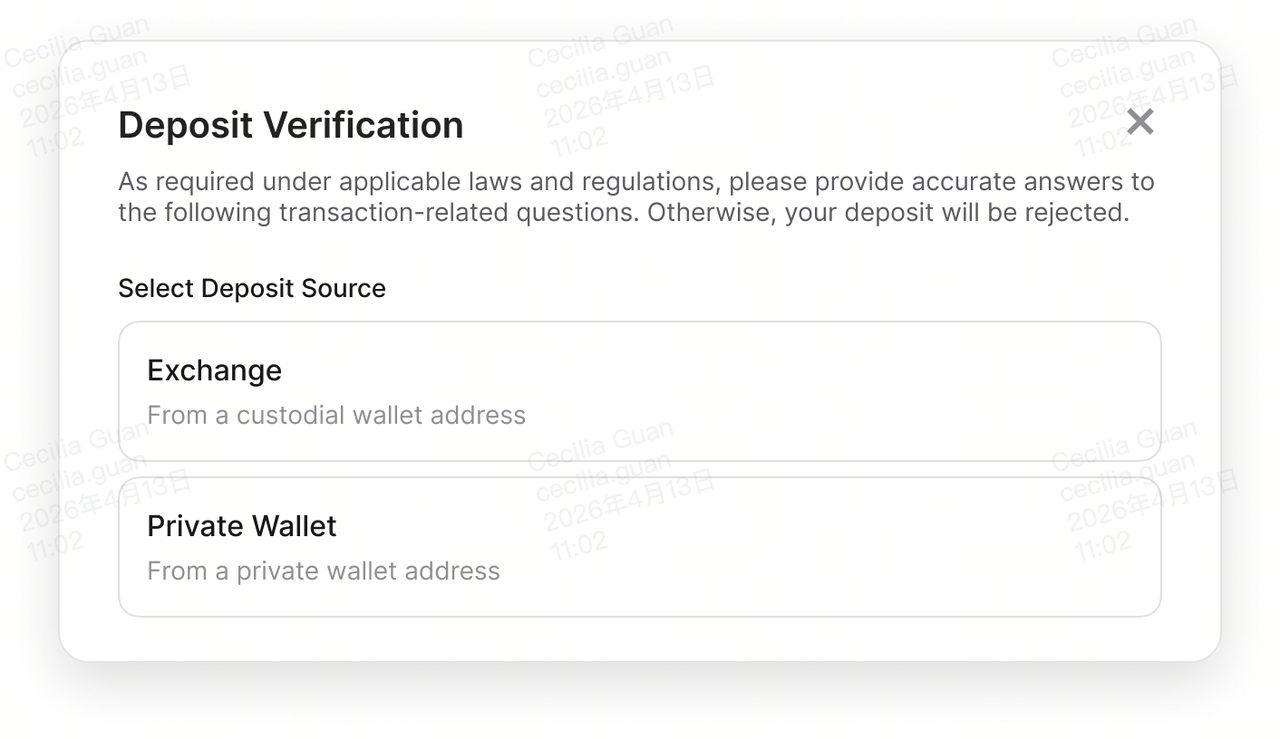
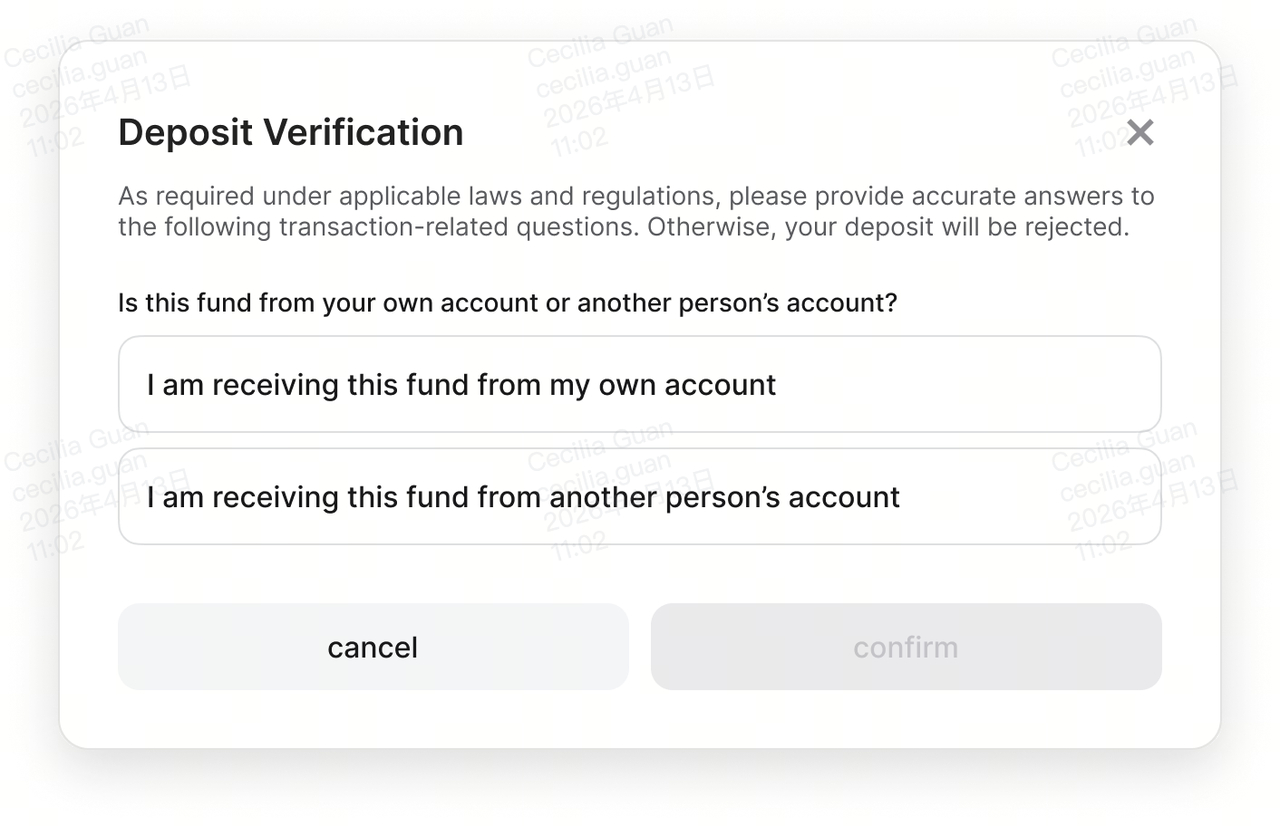
Step 2: Confirm whose account the deposit comes from
Indicate whether the sending wallet belongs to:
-
Yourself (self-transfer)
-
A third party
If You Receive
Deposits from Exchanges or Crypto Platforms (VASP)
In certain cases, you may be required to provide:
-
Name of the originator exchange or crypto platform
-
Whether the deposit is from an individual or company account
If You Receive
Deposits from Private Wallets (e.g. MetaMask)
In certain cases, you may be required to provide:
-
Wallet ownership verification (via cryptographic signature or Satoshi test) if the deposit amount exceeds 1,000 EUR
-
Legal name of the sender
Wallet Ownership Verification Steps:
Click the
share button to proceed with wallet ownership verification.
-
If the deposit comes from a third-party wallet: You may need to complete the required information yourself and send a secure link to the sender by email. Alternatively, simply forward the secure link to the sender so they can complete the verification.
-
If the deposit is from your own wallet: You can proceed directly to verification without entering recipient details.
The
sender completes wallet ownership verification by opening the secure link. Verification can be done via:
-
Cryptographic Signature: Connect the designated wallet (or use WalletConnect) and sign the message to confirm ownership.
-
Satoshi Test: Send a small test transaction from the wallet and provide the transaction hash.
Once ownership verification is successfully completed, the status will display
"Approved." At that point, provide the legal name of the sender to complete the deposit process.
⚠️ Important Travel Rule Notes for Deposits
|
Item
|
Detail
|
|
Trigger threshold
|
Transactions exceeding
1,000 EUR may require additional verification
|
|
One-time verification
|
Once a wallet address is verified, future deposits from the same address
may not require
re-verification
|
|
Processing delay
|
Deposits requiring Travel Rule verification may take longer to credit until verification is complete
|
|
Wallet segregation
|
In cases involving sanctioned addresses or suspicious activity, funds may be held in a segregated wallet pending review
|
Need help? If your deposit is delayed or you're unsure about Travel Rule requirements, contact Bitget EU Support with your transaction hash (TXID) for assistance.
The opinions expressed in this article are for informational purposes only. This article does not constitute an endorsement of any of the products and services discussed or investment, financial, or trading advice. Qualified professionals should be consulted prior to making financial decisions.
Share


Content
- Deposit to Bitget EU From a Web3 Crypto Wallet
- Deposit to Bitget EU From Another Exchange (VASP)
- Understanding the EU Crypto Travel Rule for Deposits
- ⚠️ Important Travel Rule Notes for Deposits
Recommended
 The Uncensored Guide on How to Spot Trade on Bitget EU2026-05-22 | 5m
 Bitget EU VIP Premier Wealth Hub Introduction2026-05-25 | 5m
 How to Buy Crypto With a Credit/Debit Card on Bitget EU2026-05-22 | 5m
Up to 6200 USDC and LALIGA merch await new users!
Claim