
Beginner's guide

Bitget EU New User Registration Guide
Beginner
2026-05-22 | 5m
Getting started on a Regulated Crypto-Asset Service Provider (CASP) in the EU is straightforward. Bitget EU operates under a compliant framework designed specifically for European users, combining streamlined onboarding that meets MiCA-aligned standards. Whether you're a first-time crypto investor or migrating from another platform, Bitget EU offers a transparent environment with a track record you can review.
| Risk Disclaimer: Crypto-assets are high-risk investments and may lose value rapidly. Returns are not guaranteed, and any gains may be subject to tax obligations in your country of residence. Please ensure you understand the risks involved before trading. |
Creating a Bitget EU account takes under two minutes. Once complete, you'll have a fully registered account ready for deposits, live trading, and unrestricted platform access. Registration supports multiple sign-up methods — including
email address, phone number, and
Google account — so you can get started using whichever option suits you best.
The step-by-step walkthrough below covers the entire registration process on the Bitget EU website, from initial account creation through KYC identity verification. The final step of KYC is required to unlock full trading functionality and comply with EU regulatory standards.
Step-by-Step Guide on How to Create A Bitget EU Account
Setting up an account on Bitget EU is a quick, fully guided process designed to meet the compliance expectations of European crypto users. As a Regulated Crypto-Asset Service Provider (CASP) serving the EU market, Bitget EU adheres to strict identity verification protocols and regional compliance requirements, ensuring every user is verified from the moment they sign up.
The steps below walk you through the complete account creation process on the Bitget EU website.
Step 1: Go to the Official Bitget EU Website
-
Go to the Bitget EU official website.
-
On the homepage, you have two options:
-
Enter your email address or phone number directly in the box and click [Start now], OR
-
Click [Sign up] to begin the registration flow.
-
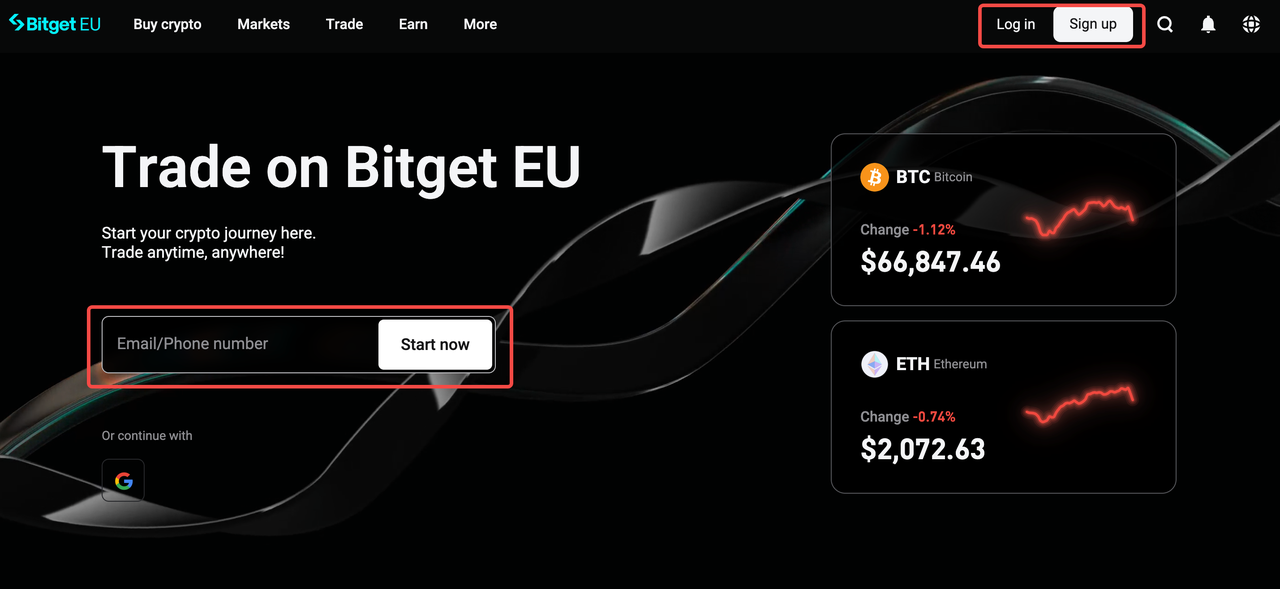
Step 2: Select Your Country of Residence
From the dropdown menu, select your
country or region of residence. This is a mandatory EU-specific step. Your selection determines your regulatory jurisdiction and defines which products and services are available to you under applicable EU financial regulations. Make sure you select your current country of residence, as this cannot be easily changed and directly affects your account configuration.
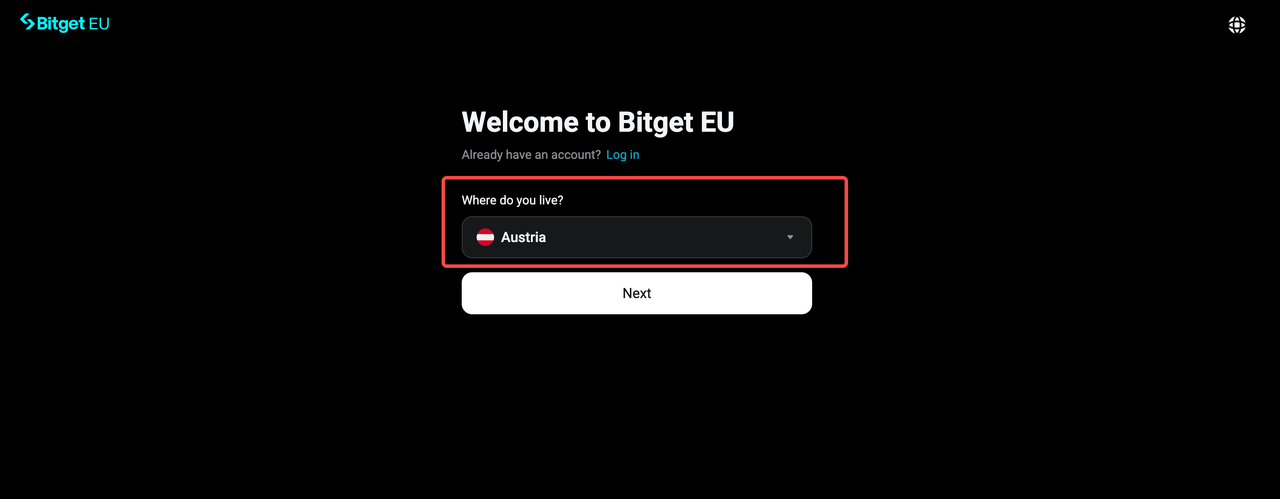
Step 3: Enter Your Account Details
3.1 Register With An Email Address
To register using an email address, fill in your
email address and
referral
code (optional; enter if you have one).
Once completed, check
both consent boxes:
-
I have read, understood and agreed to the Bitget EU Terms of Use and the Privacy Notice, which may be amended, modified and varied by Bitget EU from time to time.
-
I confirm that I am acting in my own capacity and under my own name.
These declarations are a regulatory requirement under EU financial compliance standards, confirming that the account is being created by and for the individual registering it, with no third-party involvement. Once both boxes are checked, click
[Next] to proceed
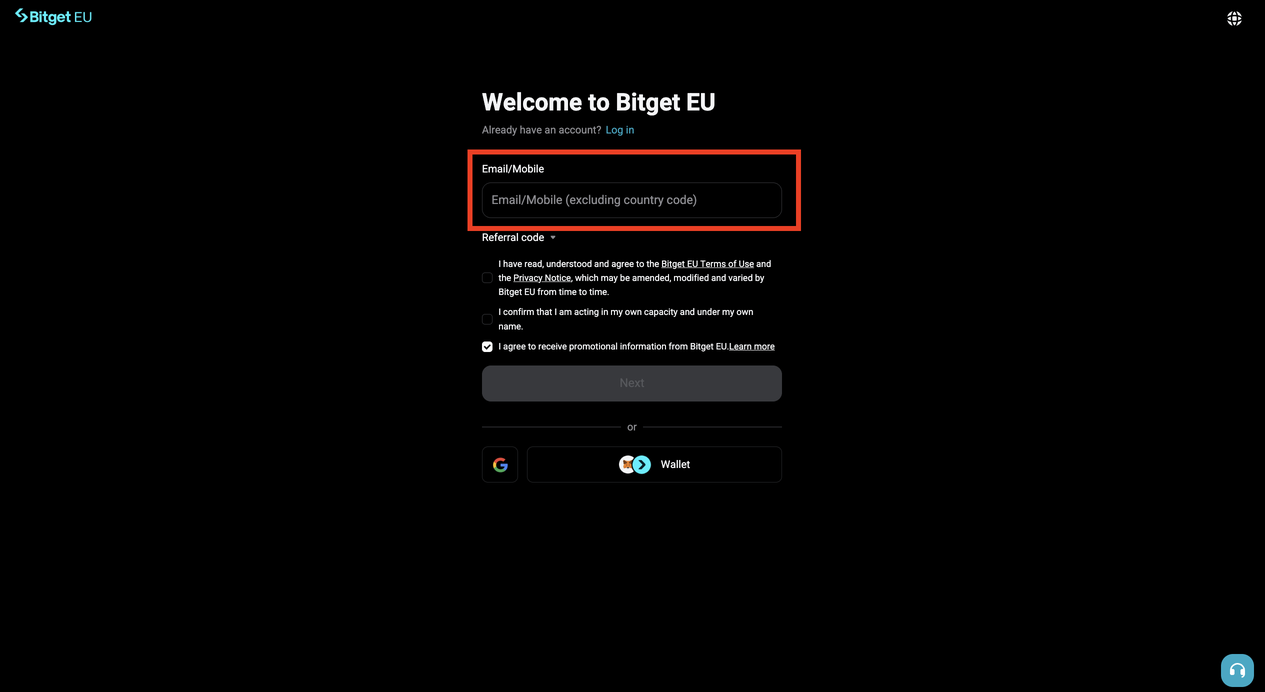
3.2 Register With A Mobile Number
Prefer to use your phone?
Start by entering your
phone number into the box, the same field used for email as mentioned above. Once the platform detects a numeric entry, the field will automatically split into two: one for your
country phone code and one for your
phone number.
Use the dropdown menu to
select the correct country phone code, then confirm your number in the adjacent field.
Add a referral code if applicable, and check both consent boxes:
-
I agree to the Terms of Use and Privacy Notice
-
I confirm that I am acting in my own capacity and under my own name
Click
[Next].
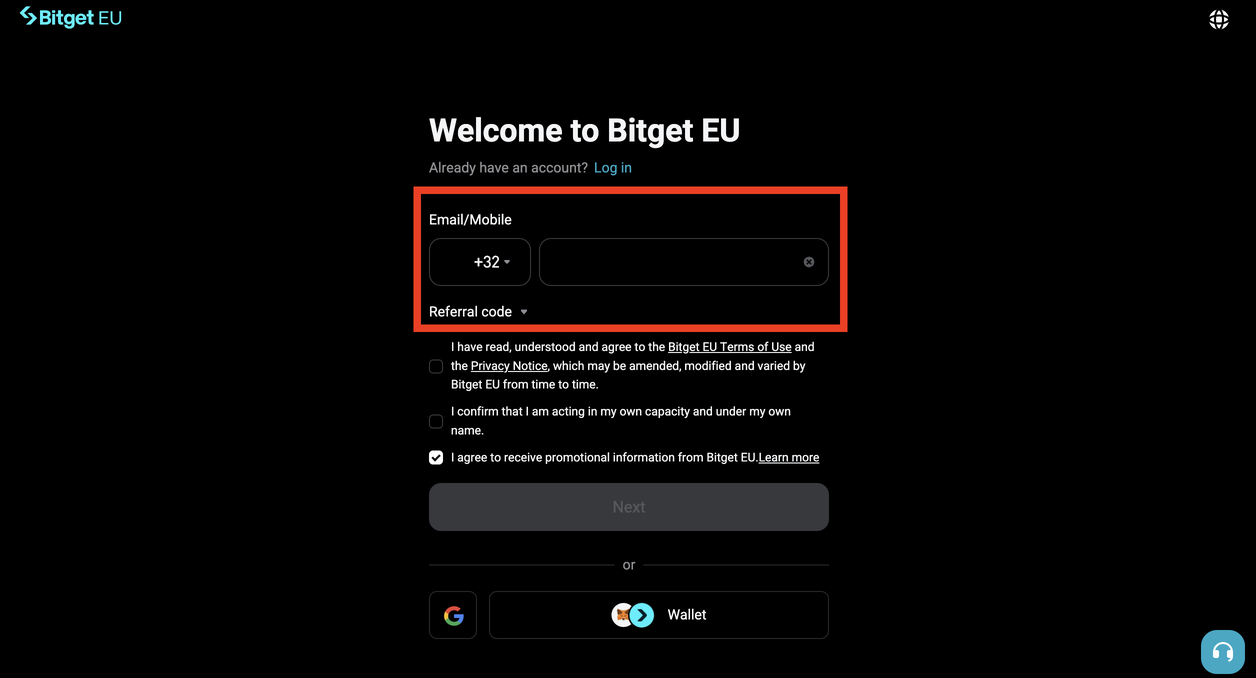
3.3 Register With a Google Account
For a faster sign-up experience, select the Google option on the registration screen. You'll be redirected to Google's authentication page. You then sign in to the Google account you want to link and grant the required permissions. Once authenticated, you'll be returned to Bitget EU to confirm your details and check both consent boxes:
-
I agree to the Terms of Use and Privacy Notice
-
I confirm that I am acting in my own capacity and under my own name
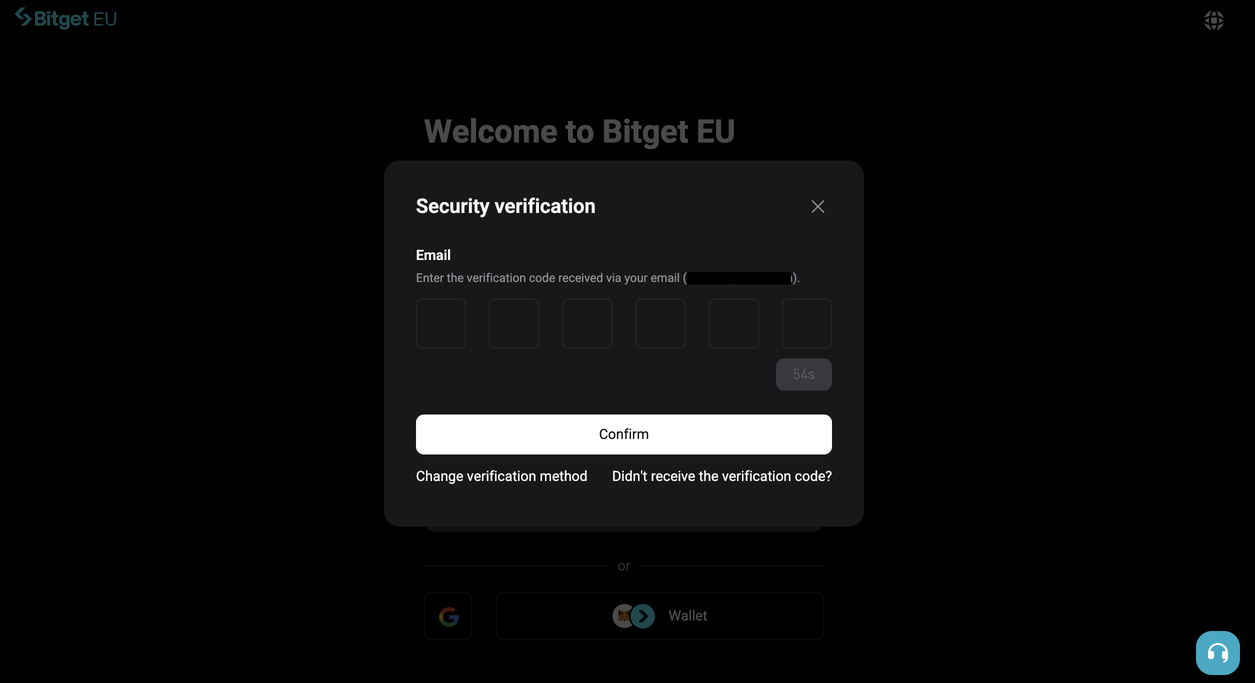
A popup will appear prompting you to verify your email. Click
[Send] to receive a 6-digit verification code to your Gmail address. Open your inbox, retrieve the code, and enter it into the popup field, then click
[Confirm] to complete this step.
Note
: Your verification code is valid for 10 minutes. If you don't receive it promptly or enter it incorrectly, you may request a new code after 60 seconds.
No separate password setup is required for this method as your Google account handles authentication going forward.
Step 4: Create a Password
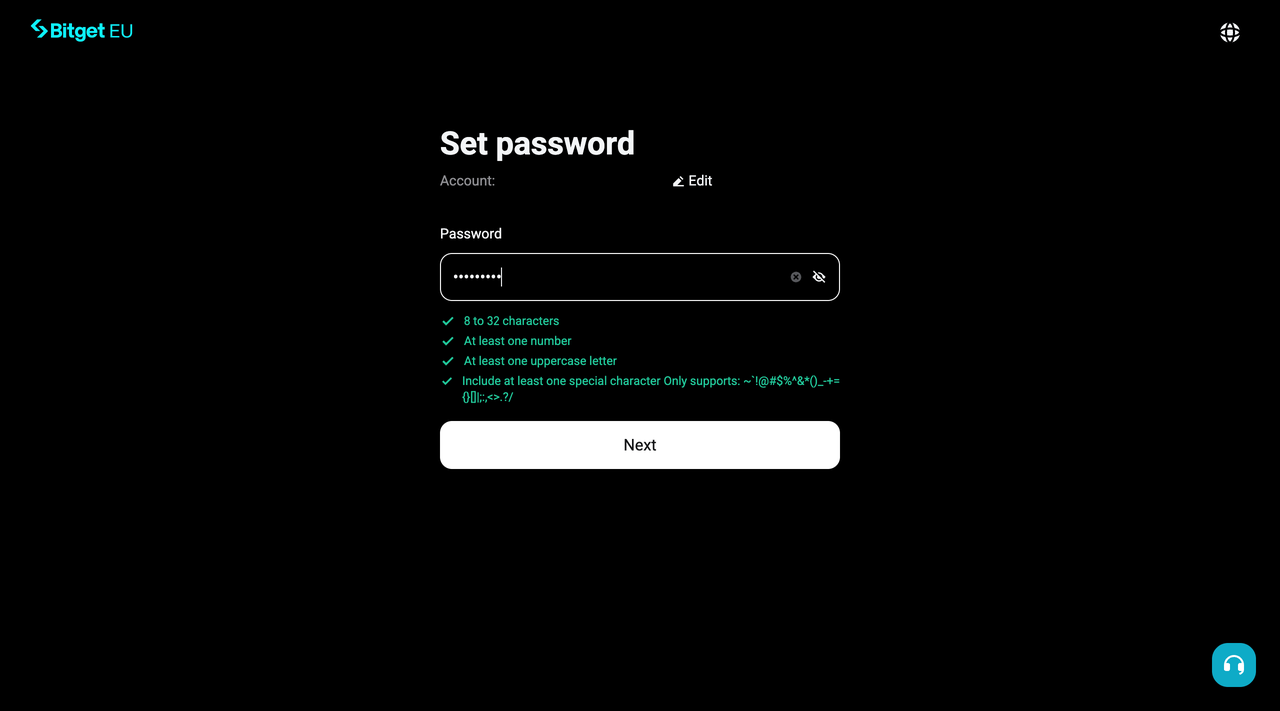
Next, create a
secure password for your Bitget EU account. Your password must meet the following requirements:
-
8 to 32 characters in length
-
At least one number
-
At least one uppercase letter
-
At least one special character — only the following are supported:~ ` ! @ # $ % ^ & * ( ) _ - + = { } [ ] | ; : , < > . ? /
Choose a password that is unique to your Bitget EU account and not reused from other platforms. Once entered, confirm your password in the field provided and click
[Next] to proceed to the next step.
Tip
: A strong password combines uppercase and lowercase letters, numbers, and special characters in an unpredictable sequence. Avoid using personal information such as your name, birthdate, or common words.
Step 5: Verify Your Email Address or Phone Number
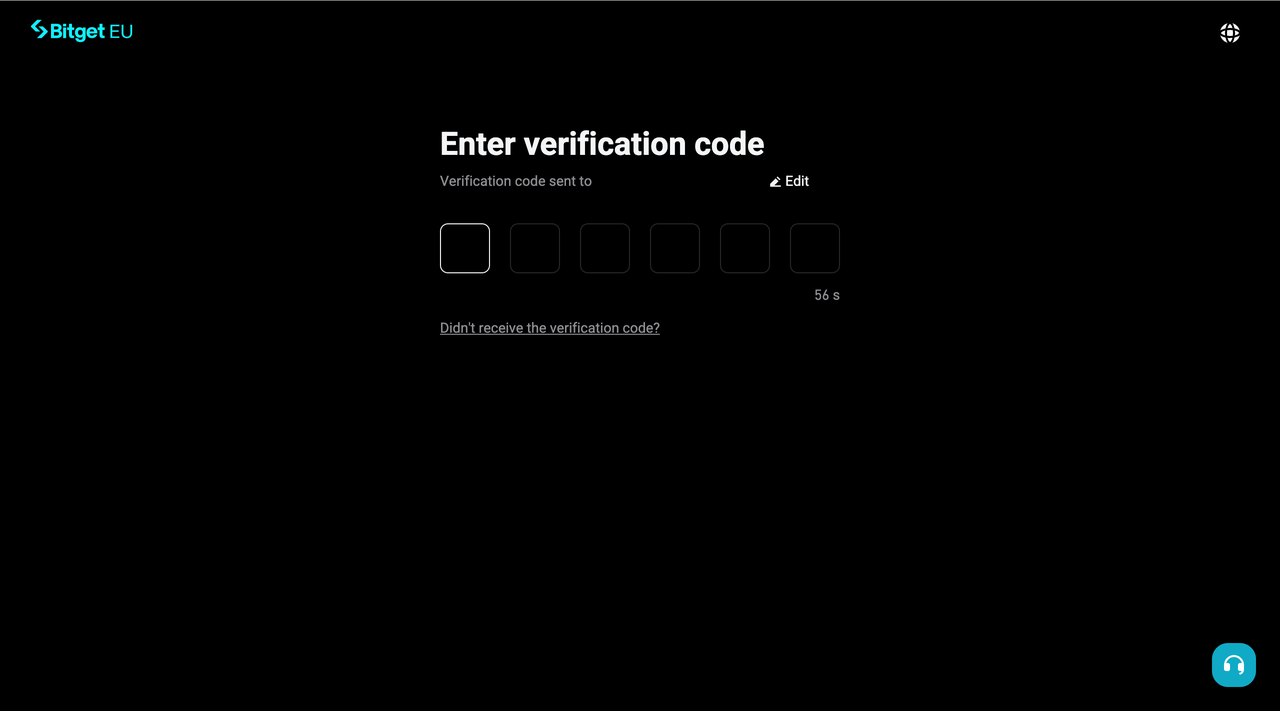
Once your password is set, Bitget EU will send a verification code to the email address or phone number you registered with. Click
[Send] to receive a 6-digit verification code to your email address or phone number. Then:
-
If you registered with an email address, open your inbox and locate the email from Bitget EU
-
If you registered with a phone number, check your messages for the incoming SMS
Enter the code into the verification field provided on screen.
Note
: Your verification code is valid for 10 minutes. If you don't receive it promptly or enter it incorrectly, you may request a new code after 60 seconds.
That's it! Your Bitget EU account has been successfully created. You can now log in and explore the platform. However, to unlock full access to all features including deposits, trading, and withdrawals, you'll need to complete
KYC (identity) verification. Continue to the next step to get that done.
Step 6: Begin KYC Verification
KYC (Know Your Customer) verification is mandatory for all users on Bitget EU. It's a standard requirement under EU anti-money laundering regulations that also helps prevent unauthorised access to your account.
Once logged in, click
[Verify now] on the home screen OR click on your avatar in the top right corner and choose
Identity verification.
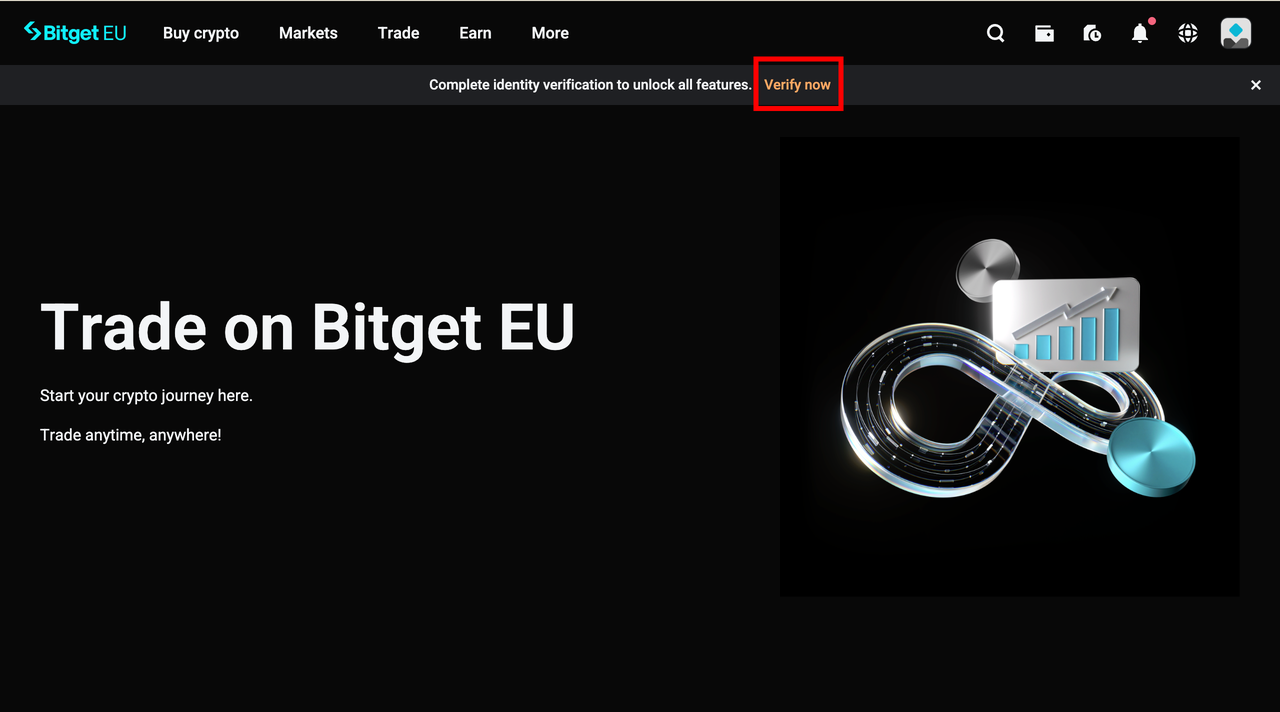
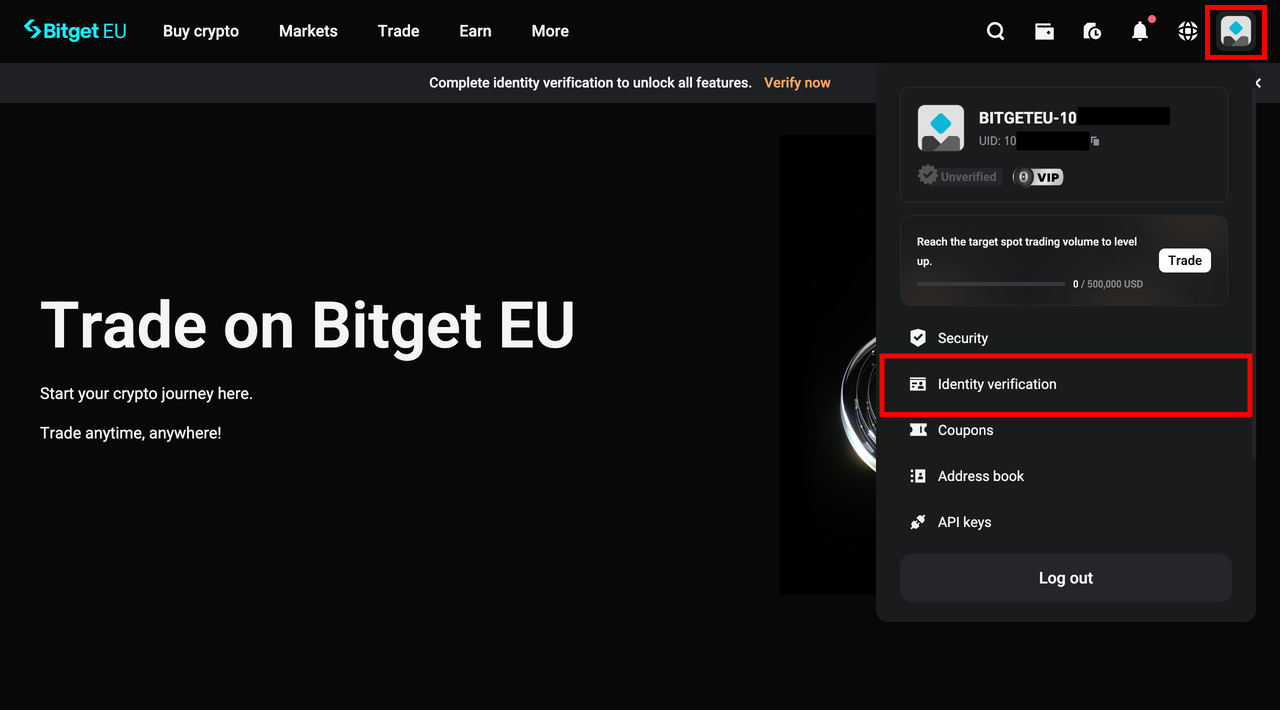
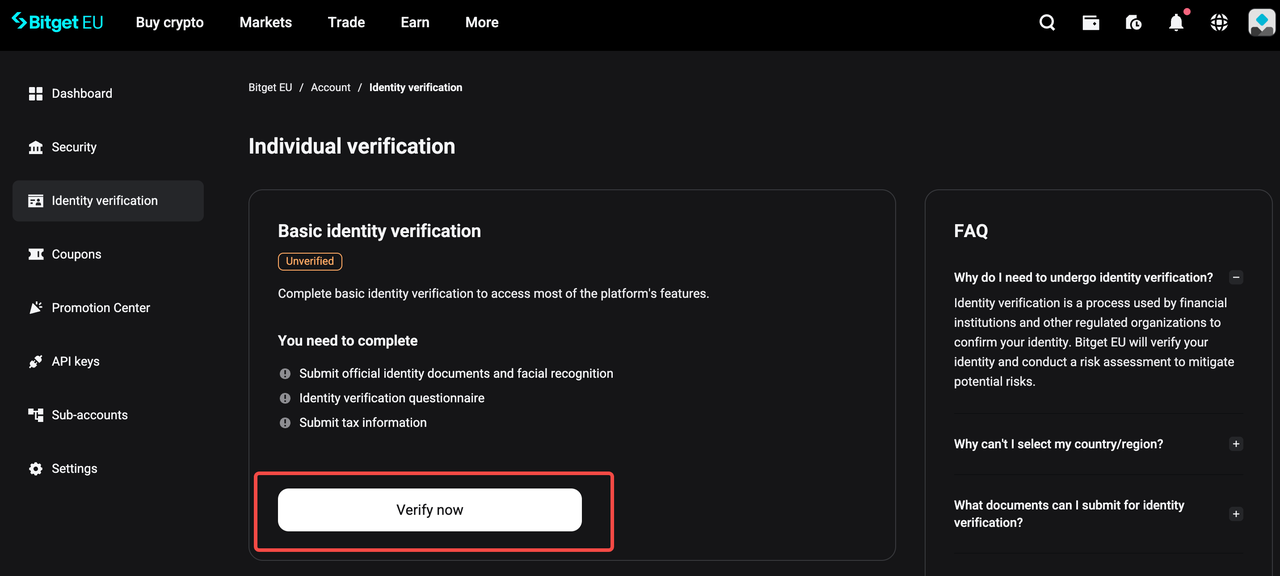
You will be taken to the
Identity verification page.
Click
[Verify now] to begin the identity verification process.
Step 7: Choose Your Document Type and Issuing Country
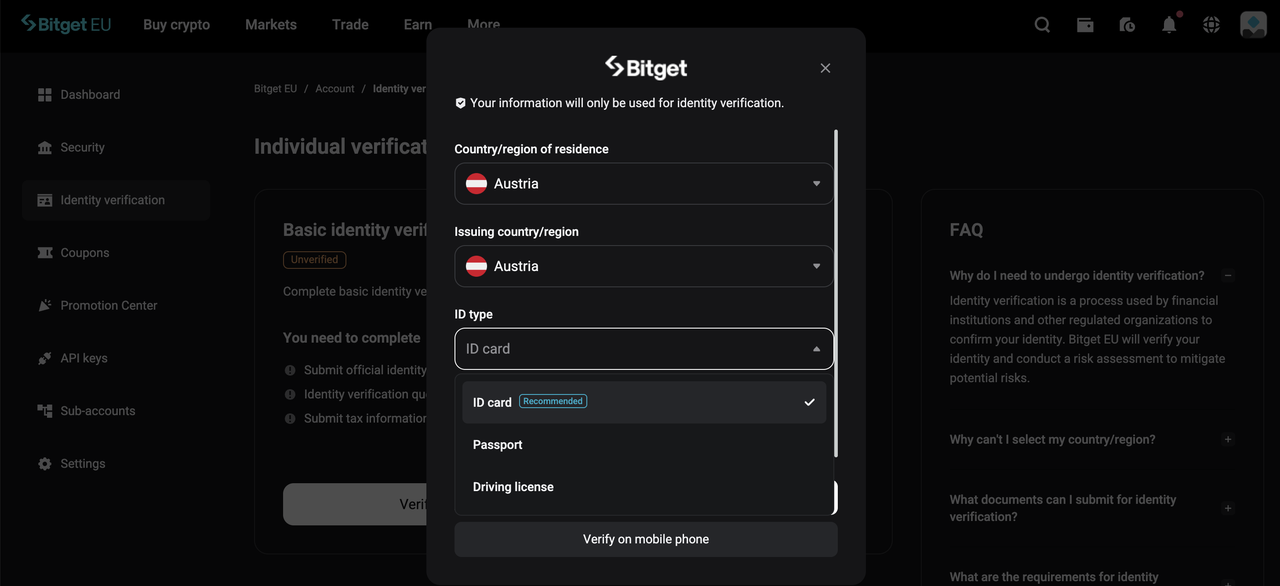
Use the dropdown menus to select:
-
Your country or region of residence
-
The issuing country or region of your identity document
Next, choose your preferred ID type (such as a national identity card, passport, or residence permit) and click
[Continue]. Have your identity document physically on hand at this point. You'll need to photograph it in the next step.
Step 8: Complete the ID Verification Process
Follow the on-screen, step-by-step instructions to photograph and submit your identity document. The interface is designed to guide you through each stage clearly.
For a detailed walkthrough on ensuring your KYC submission is accepted on the first attempt, refer to:
How to Complete KYC on Bitget EU: A Step-by-Step Guide for New Users
Step 9: Registration Complete — Your Account Is Active
Your Bitget EU account is officially created from the moment you complete email address or phone number verification. From that point, you already have access to the platform. However, submitting your KYC documents is what unlocks
full access to all features, including deposits, live trading, and withdrawals. Submitting your KYC documents triggers a review by the Bitget EU compliance team, after which you'll receive an email notification confirming the outcome.
Once your KYC is approved, your account will be fully verified and ready for deposits, trading, and complete access to all features available to EU users on a compliant crypto trading platform.
Important:
-
Standard KYC processing time is within one hour; in most cases, it will not exceed four hours.
-
If your application is unsuccessful, you will receive an explanatory email from Bitget EU.
-
If you have not received any communication after four hours, contact the Bitget EU Customer Support team immediately.
|
🔒
Bot Verification Reminder
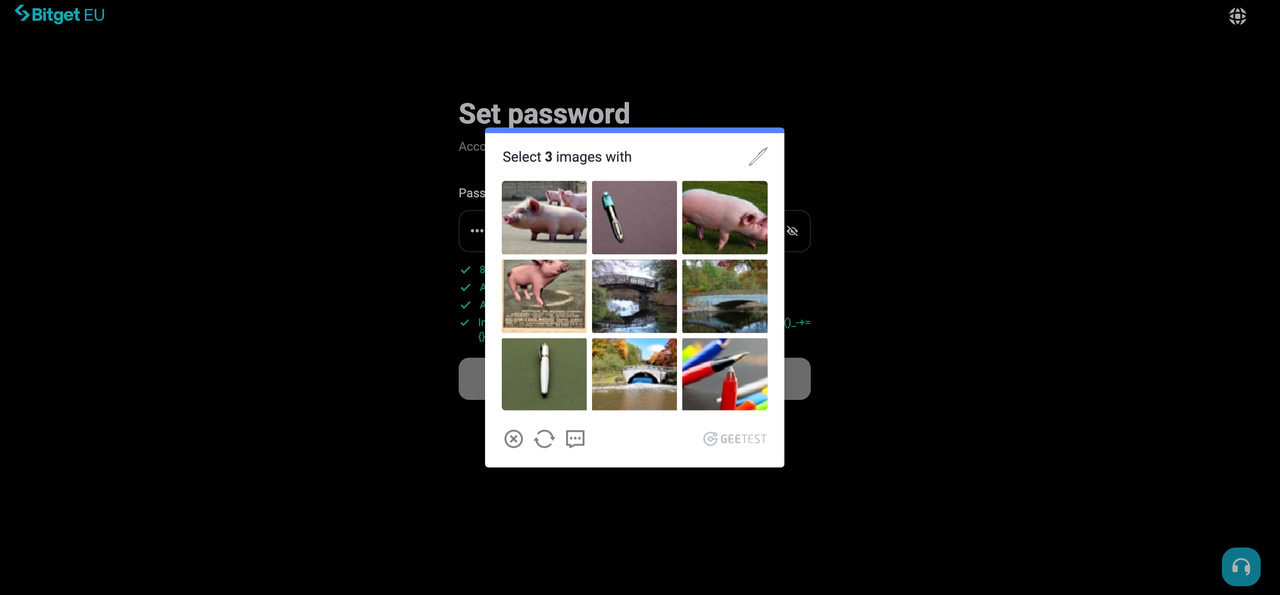
: At various points throughout the registration and KYC process, you will be prompted to complete a bot verification test. When this appears, read the requirement stated in the top line of the popup carefully — it will instruct you on what to identify — then select the corresponding images to complete the test and proceed.
|
You're All Set! Welcome to Bitget EU!
Registering on Bitget EU is a straightforward process designed with European users in mind, built around regulatory compliance and transparency that the EU crypto market demands. From the moment you verify your email or phone number, your account is live. Once KYC is approved, every feature on the platform is yours to use.
Bitget EU offers a combination of diverse financial tools, MiCA-aligned compliance protocols — giving you the assurance that your assets and personal data are held to high institutional standards.
Whether you're making your first crypto deposit, exploring spot markets, or simply looking for a regulated EU alternative to your current exchange, Bitget EU is built to deliver.
New to the platform and not sure where to go next? Here are a few recommended reads to help you get started:
The opinions expressed in this article are for informational purposes only. This article does not constitute an endorsement of any of the products and services discussed or investment, financial, or trading advice. Qualified professionals should be consulted prior to making financial decisions.
Share


Content
- Step-by-Step Guide on How to Create A Bitget EU Account
- You're All Set! Welcome to Bitget EU!
Recommended
 The Uncensored Guide on How to Spot Trade on Bitget EU2026-05-22 | 5m
 Bitget EU VIP Premier Wealth Hub Introduction2026-05-25 | 5m
 How to Buy Crypto With a Credit/Debit Card on Bitget EU2026-05-22 | 5m
Up to 6200 USDC and LALIGA merch await new users!
Claim