How to Withdraw Cryptocurrency from Bitget EU - Website Guide
[Estimated Reading Time: 3 minutes]
This article provides a step-by-step guide on how to withdraw crypto-asset from your Bitget EU account using the website. Follow these instructions to ensure a smooth and secure withdrawal process.
Before you begin
-
Ensure your account is fully verified through our KYC (Know Your Customer) process.
-
Double-check the wallet address to avoid incorrect transactions, as crypto-asset withdrawals are irreversible.
-
Confirm the withdrawal fees and network options for your chosen crypto-asset.
How to Withdraw Crypto-asset from Bitget EU?
Step 1: Navigate to the withdrawal section
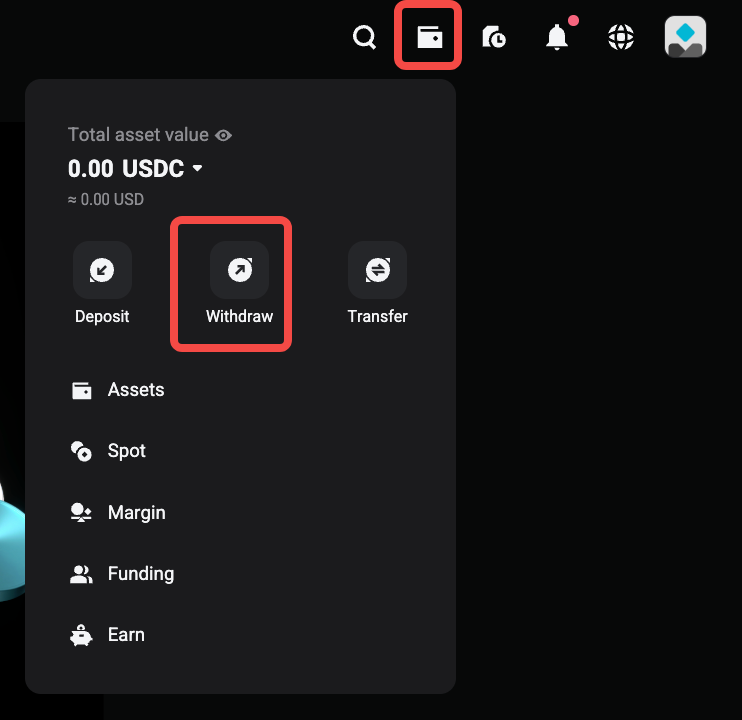
1. Log in to your Bitget EU account and click on your wallet icon located at the top-right corner.
2. From the dropdown menu, select Withdraw.
Step 2: Choose your crypto-asset
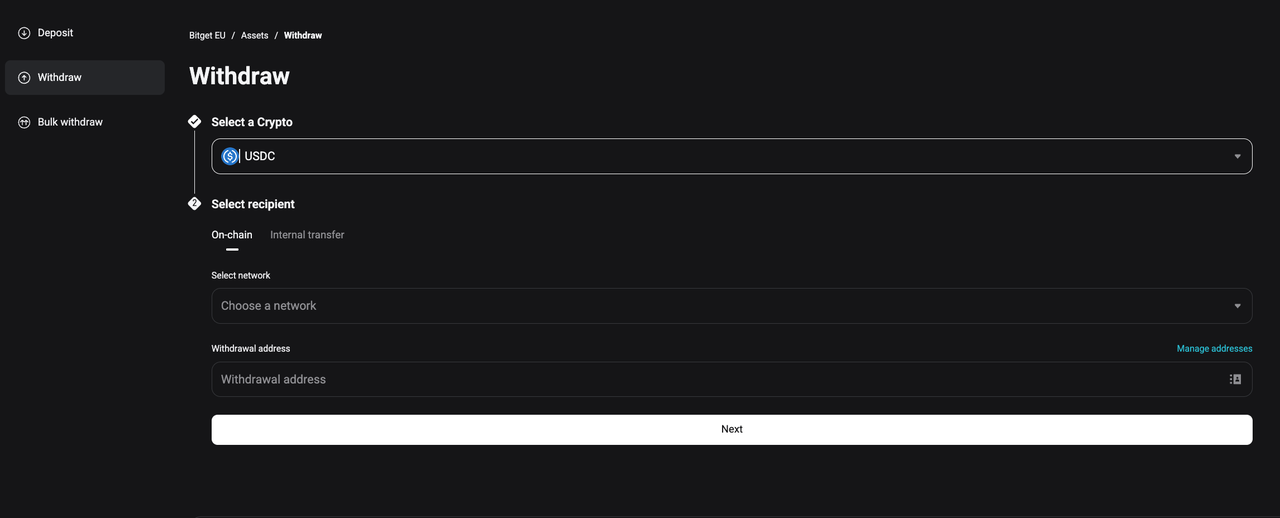
1. Choose the crypto-asset you want to withdraw using the search bar.
2. Click on the crypto-asset to proceed.
Step 3: Enter the withdrawal details
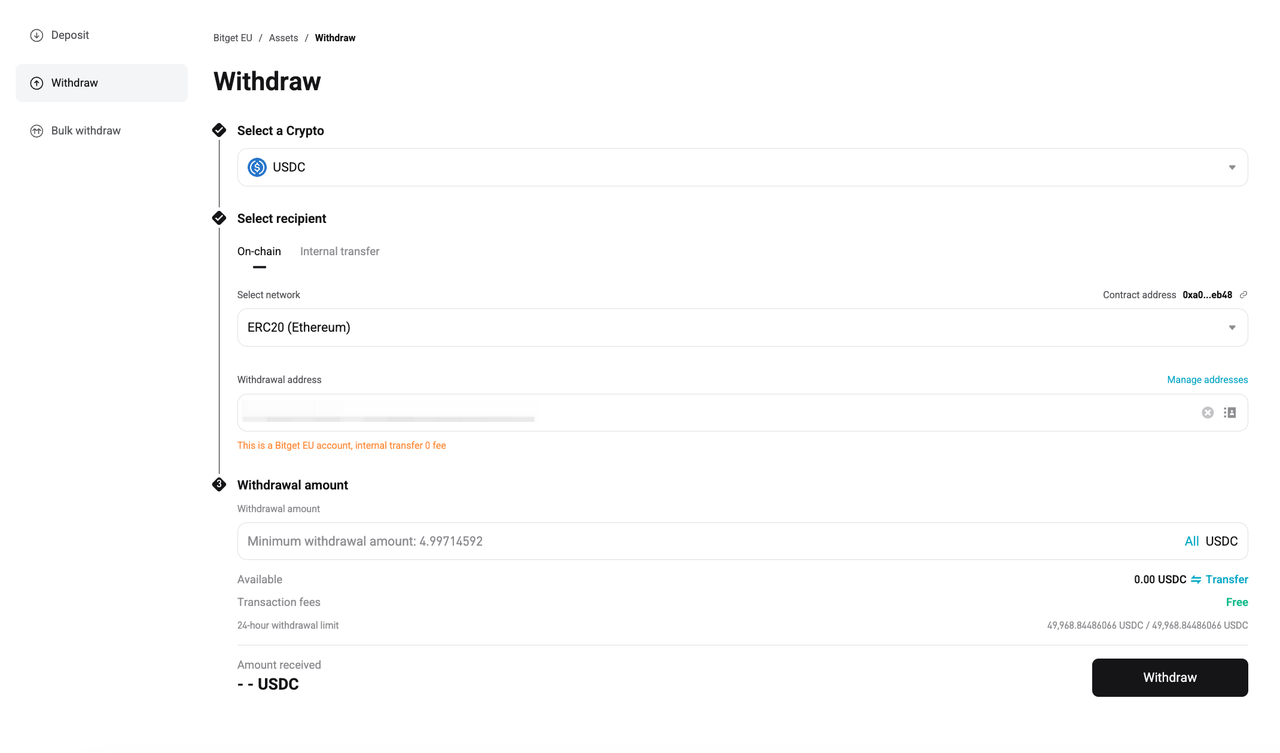
1. Paste the wallet address: Ensure it matches the network type (e.g., ERC-20, BEP-20).
-
You can also use the Scan QR Code feature, if available, for quick and accurate input.
2. Select the network: Confirm that the selected network matches your destination wallet.
3. Enter the amount: Specify the amount you wish to withdraw.
-
The system will display the applicable transaction fees and the amount received. Withdrawal fees depend on crypto-asset and the network selected.
Step 4: Confirm the withdrawal
1. Double-check all details (crypto-asset, wallet address, network, and amount).
2. Click Withdraw.
3. Complete the security verification, which may include:
-
Email confirmation.
-
Google Authenticator (2FA) code.
-
SMS verification code.
Step 5: Monitor the withdrawal status
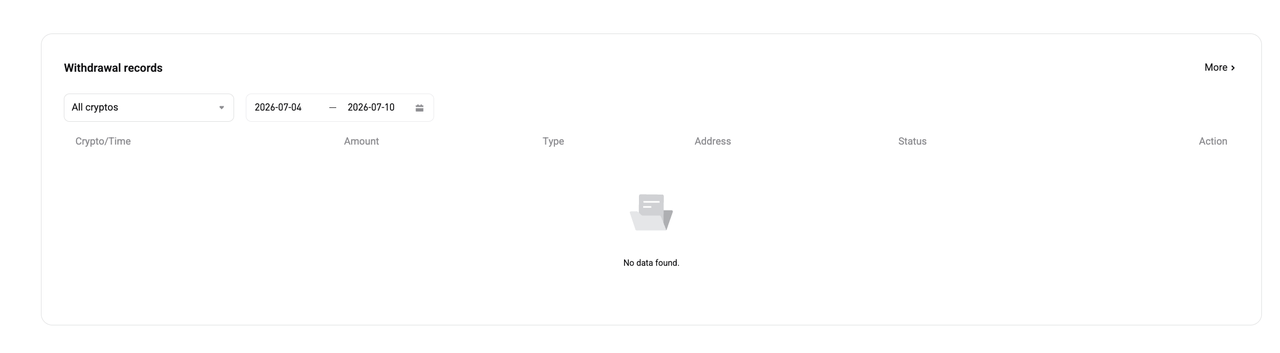
1. After submitting, you will see all your transaction details displayed, including the status.
-
Statuses include Processing, Completed, or Failed.
Tips for a Successful Withdrawal
-
Verify that your receiving wallet supports the selected crypto-asset and network.
-
Check the network congestion on blockchain explorers for delays.
-
Ensure you have sufficient balance, including fees.
FAQs
1. What is the minimum withdrawal amount for cryptocurrencies on Bitget EU?
The minimum withdrawal amount varies by crypto-asset. You can view the limits in the withdrawal section when selecting your crypto-asset.
2. What are the fees for withdrawing crypto-asset?
Withdrawal fees depend on the crypto-asset and the network selected. Fees are displayed during the withdrawal process.
3. How long does it take for withdrawals to process?
Most withdrawals are processed within a few minutes. However, delays can occur due to network congestion or additional security checks.
4. What happens if I use the wrong wallet address?
Crypto-asset withdrawals are irreversible. If funds are sent to the wrong address, they cannot be recovered.
5. Do I need to complete KYC to withdraw crypto-asset?
Yes, KYC verification is required to enable withdrawals on Bitget EU.
6. What is 2FA, and why is it required for withdrawals?
Two-Factor Authentication (2FA) adds an extra layer of security by requiring a one-time code generated by your authenticator app or sent via SMS/email.
7. Can I withdraw crypto-asset without linking an email or phone number?
No, email or phone verification is mandatory for withdrawal security.
Join Bitget EU — Your Trusted Crypto Platform in Europe.
T&Cs apply. Crypto-asset prices are highly volatile, which may result in a significant or total loss of the value of the assets held by you. Carefully assess the risks before investing. This content constitutes a marketing communication within the meaning of the Markets in Crypto-Assets Regulation (MiCAR) and is provided by Bitget EU. It does not constitute investment advice.
Share